Guides
Video File Size by Quality: What to Expect

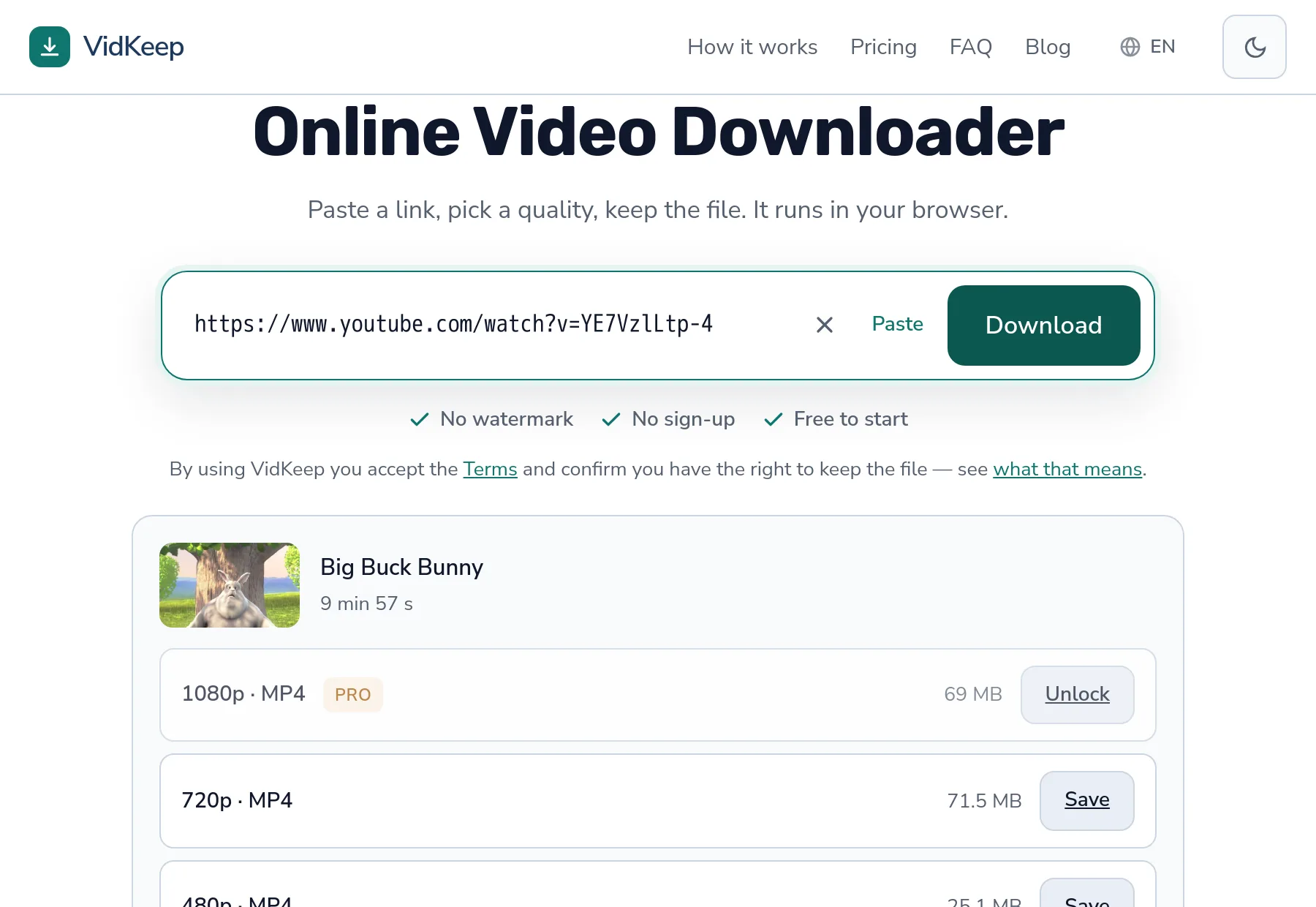
Most size guides give you a formula and a shrug. This one gives you measurements from real files: a ten-minute video comes to 69 MB at 1080p and 71.5 MB at 720p — yes, the sharper one is smaller, and there is a good reason. Below: the actual numbers, why estimates mislead, and how to judge before you tap download.
A real ten-minute video, measured
These are not calculated averages. This is one ordinary video, as our tool reports each option before download:
| Quality | Size | Per minute |
|---|---|---|
| 1080p | 69.0 MB | ~6.9 MB |
| 720p | 71.5 MB | ~7.2 MB |
| 480p | 25.1 MB | ~2.5 MB |
| 360p | 24.2 MB | ~2.4 MB |
| 240p | 7.7 MB | ~0.8 MB |
| 144p | 3.8 MB | ~0.4 MB |
Two things jump out. The first is the inversion at the top: 1080p weighs less than 720p. The second is how close 480p and 360p sit — 25.1 against 24.2, barely a megabyte apart, for a noticeable difference in picture.
Neither of those would appear in a table of averages, and both change what you should actually pick.
Why 1080p can be smaller than 720p
Resolution is how many pixels there are. File size is how many bytes were spent describing them. Those are different questions, and the codec is what connects them.
Platforms do not encode every resolution the same way. The 1080p stream is often VP9 or AV1 — newer codecs that compress far more efficiently. The 720p stream is frequently older H.264, kept for compatibility with devices that cannot decode anything newer.
A newer codec can describe more pixels with fewer bytes. So the higher resolution ends up lighter, and the label on the option tells you nothing about the weight.
This is not an anomaly on one video. It is the ordinary consequence of a platform serving the same content encoded several ways, and it is why picking ‘the smaller one’ by reading resolution labels leads you wrong about as often as it leads you right.
Rough rules, and where they break
If you have no size shown and must guess, these hold for typical content:
| Quality | Rough MB per minute |
|---|---|
| 144p | 0.3–0.5 |
| 360p | 2–3 |
| 720p | 5–8 |
| 1080p | 6–12 |
| 4K | 25–50 |
Note how wide those ranges are, and note that 720p and 1080p overlap. That overlap is the codec effect again — the ranges cannot be narrower and still be honest.
What makes a video land at the top or bottom of its range:
- Motion. A static talking head compresses beautifully. Fast camera movement, confetti, water, fire — all expensive.
- Frame rate. 60 fps needs roughly half again as much data as 30 fps at the same resolution.
- Detail. Grass, foliage and crowds cost more than flat surfaces.
- Age. Older uploads often use older codecs, so they weigh more for the same picture.
Choosing by size rather than by habit
The practical way to decide, given the numbers above:
- Look at the number, not the label. The size is shown before you commit. Sometimes the higher quality costs nothing extra.
- Match the screen. On a phone, 720p and 1080p are hard to tell apart. On a TV, the difference is obvious.
- Mind the connection. On mobile data, 25 MB against 70 MB matters more than the picture does.
- Skip the middle when it is pointless. If 480p and 360p differ by one megabyte, take 480p — you are paying nothing for the better picture.
And if you only need the sound, audio downloads are a fraction of any of these — the audio-only option on a short clip came to 0.3 MB where the video was several times that.
Why estimates in other guides are usually wrong
Search this topic and you will find confident tables: 1080p is X megabytes per minute, 4K is Y. Those numbers come from bitrate arithmetic — multiply the encoding bitrate by the duration and you get a size. The arithmetic is correct. The premise is not.
The premise assumes every 1080p video is encoded at the same bitrate, which is not how modern platforms work. They encode adaptively: a static interview and an action sequence at the same resolution get very different amounts of data, because one needs it and the other does not.
| Content type | Compresses | Effect on size |
|---|---|---|
| Talking head, fixed camera | Extremely well | Well below the estimate |
| Screen recording, slides | Very well | Often a third of the estimate |
| Sports, handheld motion | Poorly | At or above the estimate |
| Fireworks, water, foliage | Worst case | Well above the estimate |
So a chart can tell you the shape of the answer, but not the answer. For a screen recording of a lecture, a generic table will overstate the size by a factor of two or three; for a drone shot over a forest it will understate it.
This is why we treat the size shown before download as the only number worth trusting: it comes from the platform, for that specific video, already encoded. Everything else is a reasonable guess about a video nobody has seen.
What the size tells you before you download
The number next to a quality is more informative than it looks. Read alongside the video's length, it lets you infer things the interface never states.
An unusually small file at a high resolution means either a newer codec or very compressible content — a lecture, a slideshow, a static camera. Both are good news: you get the sharp version cheaply.
An unusually large file points the other way: high frame rate, heavy motion, or an older upload encoded before efficient codecs existed. If you are on mobile data, that is the moment to step down a level.
Two adjacent qualities with nearly identical sizes — as with the 480p and 360p above — means the lower one is simply a worse deal. Take the better picture; it is costing you almost nothing.
No size shown at all happens occasionally when a platform does not report one for a particular stream. It is not a red flag, but it does mean you are downloading blind, and on a metered connection that is worth avoiding when an alternative exists.
None of this requires understanding codecs. It requires looking at two numbers — size and duration — and noticing when they disagree with your expectations. That habit will serve you better than memorising any table.
Storage planning, briefly
If you are saving a series rather than one clip, the arithmetic gets real:
- Ten hours of 1080p at 7 MB per minute — around 4.2 GB
- Ten hours of 480p at 2.5 MB per minute — around 1.5 GB
- Ten hours of audio at 192 kbps — around 850 MB
For a course you will listen to rather than watch, that last line is the one to notice. The same ten hours costs a fifth of the storage, and for a lecture the picture is usually a slide deck you have already seen.
Phone storage deserves a separate thought, because it is the constraint most people actually hit. A phone advertised as 128 GB gives you closer to 110 GB usable, and photos, apps and system files have first claim on it. The practical budget for downloaded video is often a handful of gigabytes rather than the number on the box, which is why choosing 480p over 1080p for a long series is not stinginess — it is the difference between the series fitting and the phone complaining halfway through.
There is also a habit worth forming: delete after watching. Downloads accumulate silently because nothing prompts you to remove them, and a folder of watched videos is the single largest reclaimable space on most phones. A monthly sweep of the Downloads folder frees more room than any amount of careful quality selection.
And if the videos matter enough to keep permanently, move them off the phone rather than downgrading the quality. External storage is cheap, a phone is not, and a 1080p copy on a hard drive is worth more in three years than a 360p copy you kept because it was small.
Why we show the real size instead of a quality badge
Most tools in this category show a resolution and a badge — HD, Full HD, sometimes a star. We show the number of megabytes, and it is worth explaining why that is not just a stylistic preference.
When a platform tells us what formats a video has, the response includes a size or a close estimate for each stream. Passing that straight to you costs nothing. Hiding it behind a badge costs you the ability to choose sensibly, particularly on mobile data where a wrong guess is a real amount of money.
The measurements in this article come from that same path. We did not calculate 69 MB from a bitrate formula — we asked the platform and read the answer. Which is also how we learned that 1080p is sometimes lighter than 720p, a fact that would never have surfaced from a table of typical values, and that flatly contradicts the mental model most people have.
There is a caveat we should state rather than gloss over: for some streams the platform supplies an approximate size rather than an exact one, and the finished file can differ slightly. The difference is small — a few percent — and the number is still enormously more useful than ‘HD’. But we would rather you knew it was an approximation than discovered it yourself and concluded we were careless.
The broader point applies to any tool you use: if a downloader will not tell you how big a file is before you commit, ask yourself why. The information exists, it is free to pass along, and withholding it only benefits the side that would rather you did not compare.
One further wrinkle we ran into while gathering these numbers. A very short clip behaves quite differently from a long one: on a nineteen-second video the whole ladder collapses to under a megabyte at every quality, and the audio-only option came to 0.3 MB. Per-minute rules are useless at that scale, because the fixed overhead of a file — headers, index, container structure — stops being negligible.
That is a small thing, but it is the kind of small thing that makes generic size charts misleading at both ends. Short clips are cheaper than any formula suggests; hour-long recordings with high frame rates are dearer. The number shown before you download already accounts for all of it, which is the entire argument for showing it.
Frequently asked questions
How big is a 10-minute video at 1080p?
Around 69 MB on the file we measured — roughly 7 MB per minute. Expect 6–12 MB per minute depending on motion, frame rate and how old the upload is.
Why is 1080p smaller than 720p sometimes?
Different codecs. 1080p is often VP9 or AV1, which compress far better than the H.264 used for 720p. More pixels, fewer bytes.
How much storage does an hour of video need?
At 1080p, roughly 420 MB. At 480p, about 150 MB. Audio only, about 85 MB.
Does frame rate change file size?
Yes, substantially. 60 fps needs roughly half again as much data as 30 fps at the same resolution.
Are the sizes shown before download exact?
Usually, though for some streams platforms supply an approximation and the finished file differs by a few percent.
What is the smallest useful quality?
360p for watching on a phone in a pinch, audio-only if you just need the sound. 144p is genuinely hard to watch on anything.
VidKeep runs in your browser — paste a link, pick a quality, keep the file. No account, no app.
Open VidKeepLast updated: 2026-08-17. We revise our guides as the platforms change.