Guides
H.264 vs VP9 vs AV1: Which to Choose

Three codecs carry almost all video online, and the choice between them is a trade between size and compatibility. H.264 plays everywhere and makes the largest files. VP9 is meaningfully smaller and plays on most modern things. AV1 is smallest and pickiest. If you want one rule: take H.264 unless you know the device is recent, because a smaller file that will not open is worth nothing.
What each codec is, in one line
| Codec | Arrived | Size vs H.264 | Plays on |
|---|---|---|---|
| H.264 (AVC) | 2003 | Baseline | Essentially everything made this century |
| VP9 | 2013 | Roughly 30–50 % smaller | Modern browsers, phones from about 2015 |
| AV1 | 2018 | Roughly 30 % smaller again | Recent phones, current browsers, newer TVs |
Those size figures are the reason platforms bother. Serving video is expensive, and a codec that cuts bandwidth by a third at the same quality pays for itself immediately.
Which is also why you meet all three: platforms encode popular videos several times over and hand each viewer whatever their device can decode. The same video genuinely exists in multiple codecs at the same resolution.
The visible consequence: size does not follow resolution
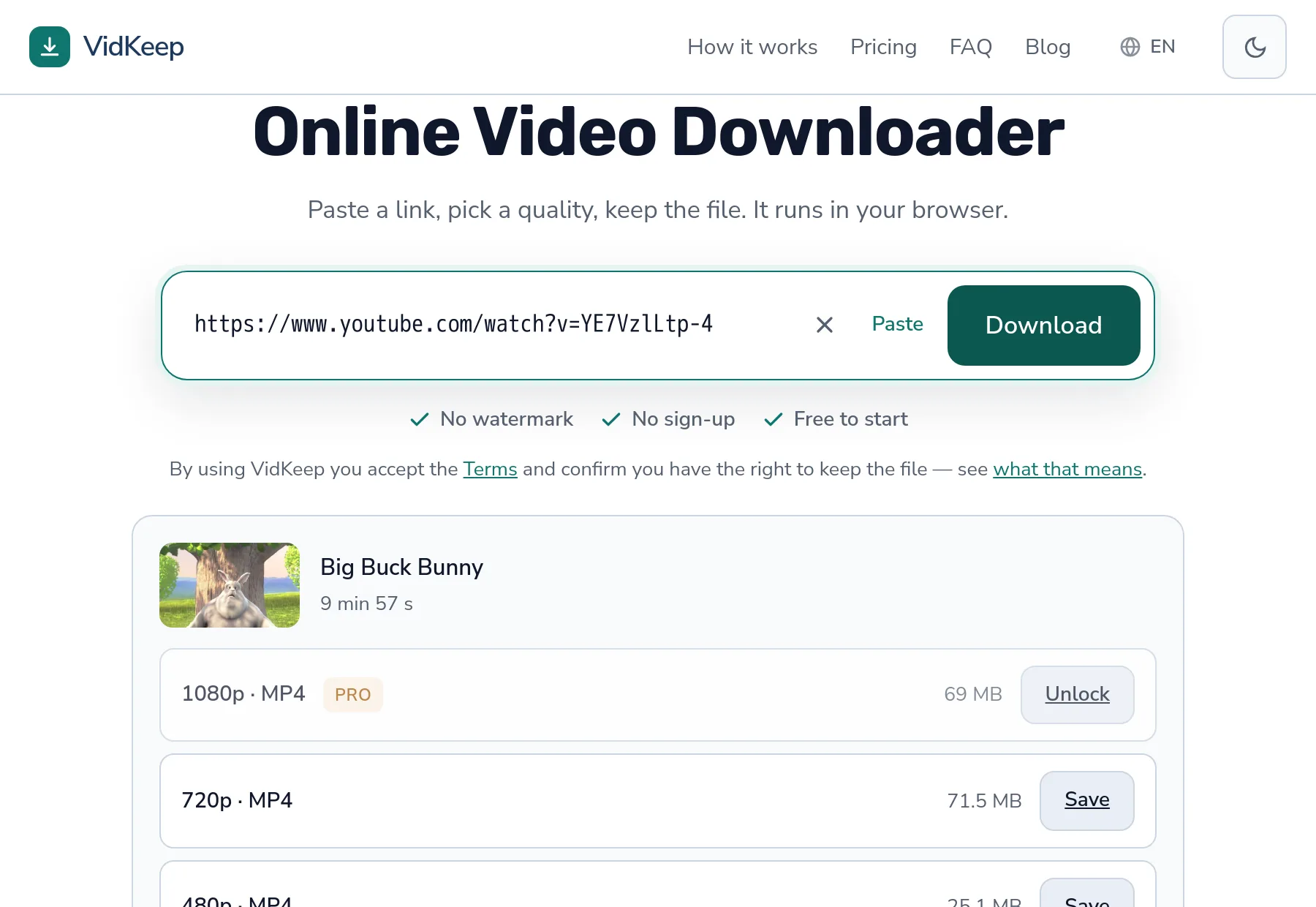
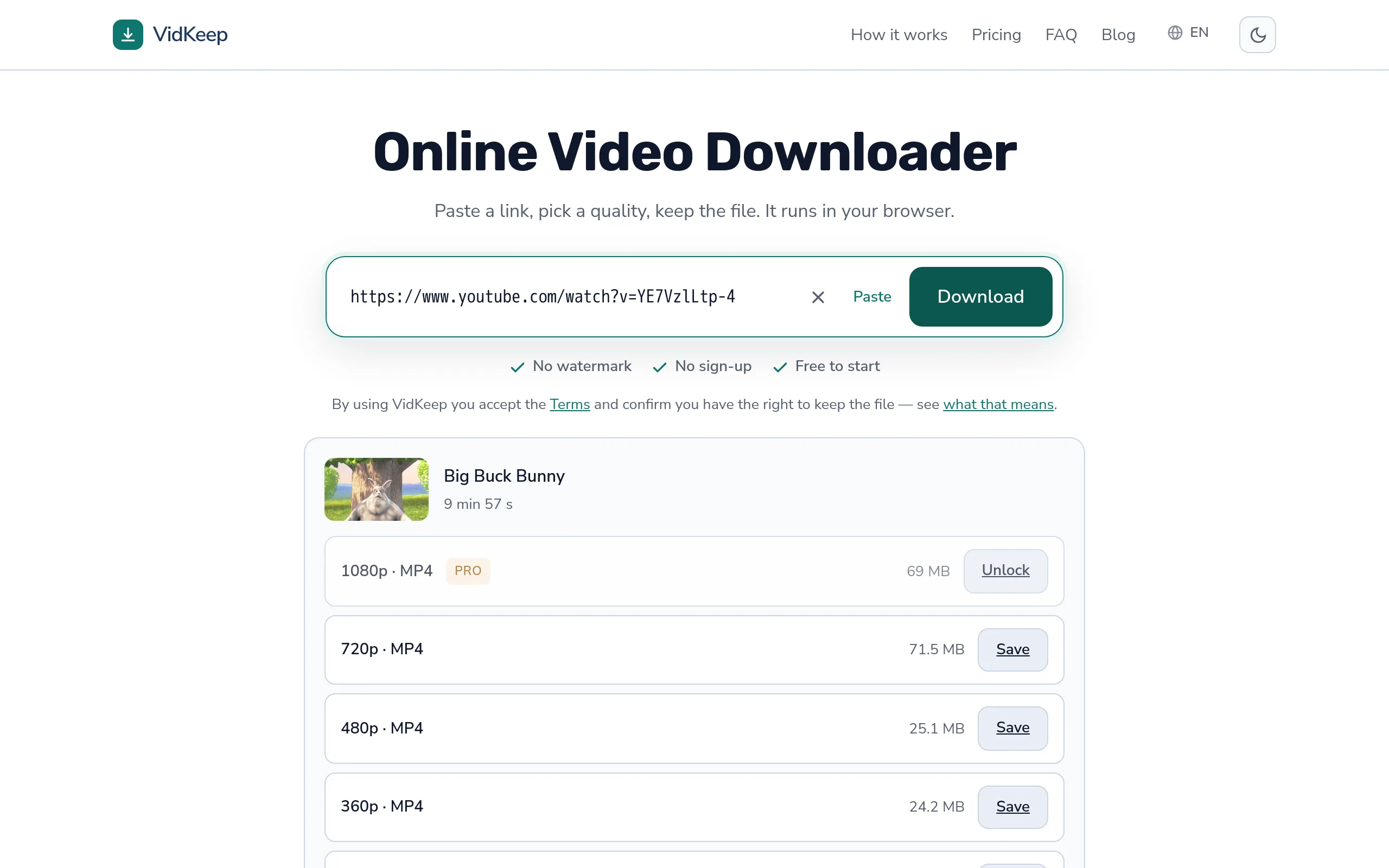
Here is a real example from a ten-minute video, as reported before download:
| Quality | Size |
|---|---|
| 1080p | 69.0 MB |
| 720p | 71.5 MB |
The sharper option is the lighter one. Not a glitch: the 1080p stream is encoded with a newer codec, the 720p stream with H.264 kept for compatibility. More pixels, better compression, smaller file.
This is the single most practical thing to take away. Resolution tells you nothing about size when codecs differ, and any habit built on ‘lower resolution means smaller download’ will mislead you regularly. Read the actual number instead — we measured a full ladder here.
Hardware decoding, and why your battery cares
A detail rarely mentioned outside technical circles, and it matters on phones.
Devices contain dedicated chips for decoding specific codecs. When your phone plays H.264, that chip does the work: fast, cool, barely touching the battery. When it meets a codec the chip does not know, the main processor decodes in software instead — several times the power draw, a warm phone, and stuttering on longer videos.
| Codec | Hardware support | Practical effect |
|---|---|---|
| H.264 | Universal for over a decade | Efficient everywhere |
| VP9 | Common since roughly 2016 | Fine on modern devices, heavy on older ones |
| AV1 | Only on recent hardware | Can be genuinely painful on anything older |
So a smaller AV1 file can be the worse choice on a four-year-old phone: you saved storage and spent battery. On a current device the same file plays effortlessly. The right answer depends on the hardware, which is exactly why there is no universal best codec.
Containers are a separate question
People routinely confuse the codec with the file extension, and they are different layers.
The container — MP4, WEBM, MKV — is the box. The codec is how the picture inside was encoded. An MP4 usually holds H.264, but it can hold AV1. A WEBM usually holds VP9. The extension is a hint, not a guarantee.
This is why ‘I downloaded an MP4 and it will not play’ is a perfectly coherent sentence. The box was familiar; the contents were not. The container side is covered separately, and the two together explain nearly every playback failure.
The practical version: if a file refuses to open, the extension will not tell you why. A player that carries its own decoders will simply play it, which is faster than diagnosing.
Which to pick, by situation
- Phone you will watch on today — H.264 if offered. Battery and certainty beat a few saved megabytes.
- Old TV, car head unit, media player — H.264, without hesitation. These devices update rarely and fail silently.
- Video editor — H.264 in an MP4. Editors handle it natively; newer codecs often need transcoding first, which costs you time and quality.
- Storage genuinely tight, device recent — VP9 or AV1 is a real saving, and modern hardware handles both.
- Archiving for years — H.264. Not because it is best, but because it will still play on whatever exists in a decade.
Notice how often the answer is the oldest codec. That is not nostalgia — compatibility compounds over time, and a file you can always open is more valuable than a file that was efficient in 2026.
There is a simple way to decide when the list does not cover your case. Ask how many different machines the file will touch before you are finished with it. One phone, watched tonight, deleted tomorrow — take whatever is smallest, the risk is nil. A file that will be copied, shared, edited or kept for years touches devices you cannot inspect in advance, and every one of them is a chance for a newer codec to fail.
The saving is also smaller than it sounds in absolute terms. Thirty per cent off a seventy-megabyte video is around twenty megabytes — genuinely irrelevant on any modern device, and worth having only when you are moving hundreds of files or working against a hard storage limit. Weigh it against a file that might not open, and the trade stops looking close.
How to tell what you actually got
Nothing in a file name records the codec, so people guess — and guess wrong, because the extension is the thing they can see.
On Windows, right-click the file, open Properties and look at the Details tab. There is a line for video compression, and it names the codec directly. On macOS, open the file in QuickTime and choose Show Movie Inspector — the format line spells it out, usually as H.264, VP9 or AV1 alongside the resolution.
A quicker signal, if you only want a rough answer: a file that plays in absolutely everything you own is almost certainly H.264. Newer codecs fail somewhere, and the somewhere is usually an older device or a program that has not been updated in years.
Knowing the answer matters mainly in one situation — when you are about to move a file to a device you cannot easily test on. Checking takes ten seconds and saves the trip.
What people get wrong about codecs
Four beliefs come up repeatedly, and each one leads somewhere unhelpful.
‘Newer is always better.’ Newer means better compression, which is a property of the file, not of your experience. On hardware without support for it, a newer codec is worse in every way that you actually notice.
‘Converting to H.264 fixes compatibility for free.’ It fixes compatibility, but not for free. Re-encoding decodes the picture and encodes it again, and the second encode cannot restore what the first one discarded. The result is slightly worse than the original and there is no setting that avoids it. Downloading H.264 in the first place costs nothing.
‘The codec controls resolution.’ It does not. Any of the three encodes any resolution. The codec decides how efficiently the picture is stored, nothing more — which is why the size table above can invert the way it does.
‘A bad codec ruined my video.’ Usually the culprit is bitrate, not codec. A generously encoded H.264 file looks better than a starved AV1 one. Codec sets the ceiling on efficiency; bitrate decides how much of that ceiling was used, and it is bitrate that platforms quietly economise on.
The thread running through all four is the same: a codec is a storage decision. It changes how much space a given picture takes and which machines can unpack it. It does not make video look good or bad on its own, and treating it as a quality setting sends you optimising the wrong number.
What our format selector asks for, and why
This choice lives in one line of our code, and it is worth explaining because it directly shapes what you receive.
When we ask a platform for a specific quality, we do not simply request ‘1080p’. We ask for 1080p preferring H.264, falling back to whatever else exists if there is no H.264 at that resolution. A tool optimising for the smallest file would invert that and take AV1 wherever it exists.
We chose otherwise after thinking about who actually gets hurt by each mistake. If we serve H.264 to someone with a new phone, they get a slightly larger file and notice nothing. If we serve AV1 to someone with an older device, they get a file that stutters, drains the battery, or will not open in the app they use — and they have no way of knowing why. The costs are not symmetric, so the default should not be either.
There is a second reason, specific to what people do with downloads. A large share of them end up somewhere other than the device that downloaded them: moved to a laptop, put on a memory stick, played on a TV, dropped into an editor. The phone that fetched the file often is not the device that plays it, which makes betting on modern hardware a bad bet even when the phone in your hand is new.
The trade-off is honest and worth stating plainly: our files are sometimes larger than the theoretical minimum, and on a recent device you could have saved space. We think a download that always works is worth more than one that is optimally compressed, and when a platform offers only newer codecs at a given quality, you get those — because that is what exists.
One consequence is worth stating because it looks like a flaw. The preference applies when we assemble a file from separate video and audio streams, which is most downloads above 360p. When a platform hands us a ready-made file instead, we pass on whatever it contains — we are not going to re-encode your video to satisfy a preference, because re-encoding costs quality and you would be paying for our tidiness.
Frequently asked questions
Which codec should I download?
H.264 unless you know the device is recent. It plays everywhere and uses hardware decoding on essentially any device, at the cost of a somewhat larger file.
Why is the 1080p file smaller than the 720p one?
Different codecs. The higher resolution is often VP9 or AV1, which compress far better than the H.264 used lower down the ladder.
Is AV1 better than H.264?
Technically yes — around 40 % smaller for the same quality. Practically it depends on your device: without hardware support it drains battery and can stutter.
Does the codec affect picture quality?
At the same file size, newer codecs look better. At the same quality setting, they simply produce a smaller file. Neither degrades the picture on its own.
What is the difference between a codec and a format?
The format or container — MP4, WEBM — is the box. The codec is how the picture inside was encoded. An MP4 can contain H.264 or AV1.
Which codec do your downloads use?
H.264 where the platform offers it, falling back to newer codecs when it does not. Compatibility first, because a file that will not play is worth nothing.
VidKeep runs in your browser — paste a link, pick a quality, keep the file. No account, no app.
Open VidKeepLast updated: 2026-08-20. We revise our guides as the platforms change.