Guides
TikTok in HD: What You Really Get

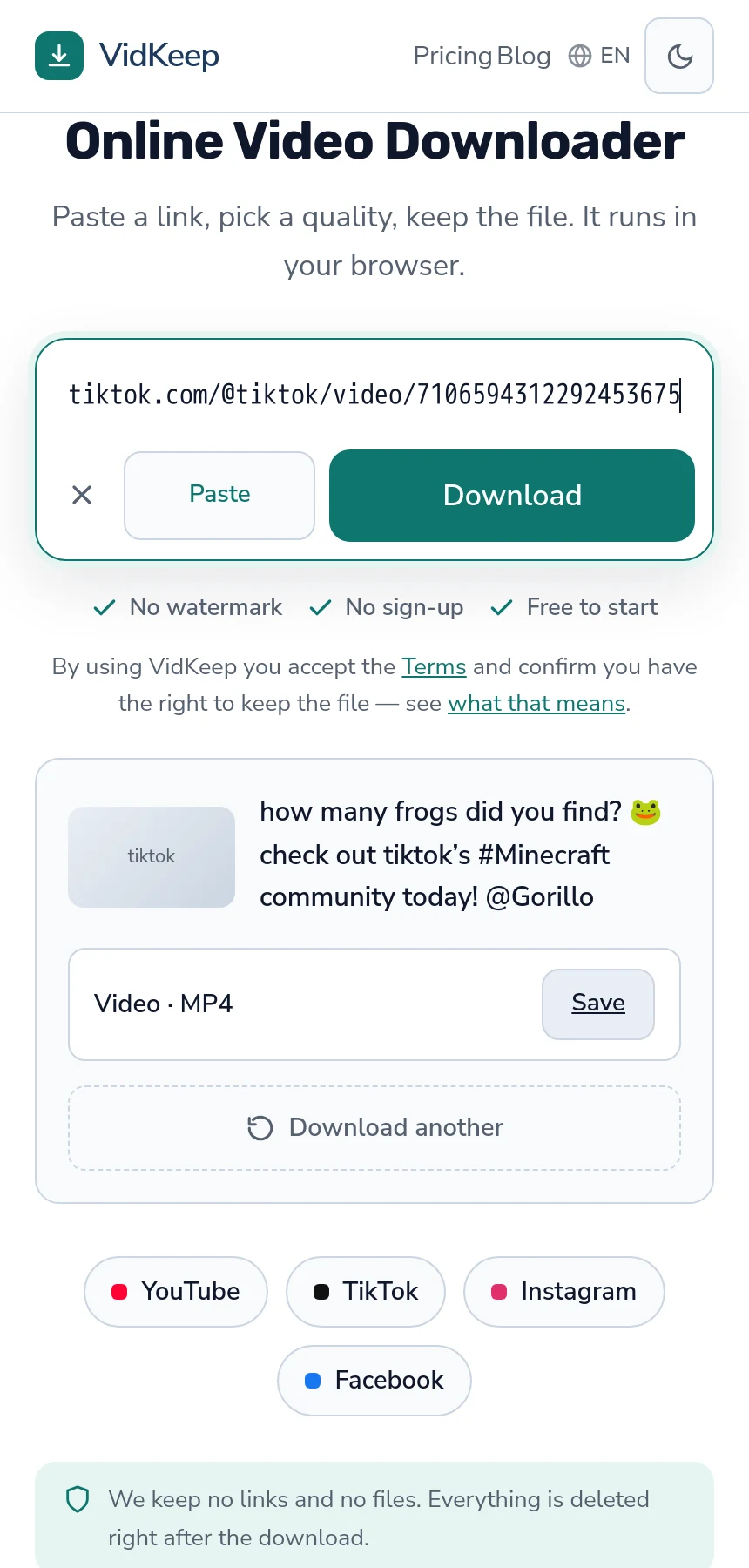
There is no quality choice, and that is not a limitation of the tool. TikTok stores one finished file per video, so a download returns that file and nothing else — no ladder of resolutions to pick from. Any site offering you 4K or ‘HD enhanced’ TikTok downloads is upscaling, which enlarges the frame without adding any detail.
Why there is nothing to choose
Long-form platforms store each quality as its own stream so a player can switch mid-video as your connection changes. Over twenty minutes that matters. Over fifteen seconds it buys nothing — the clip is buffered before anything could adapt.
So TikTok keeps one file, already combined, at the resolution its processing produced. That is why a TikTok download shows a single row labelled simply Video, with no resolution named beside it.
It also makes TikTok downloads fast. Nothing is fetched twice and nothing is joined together — the mechanics of the difference explain why YouTube behaves the other way.
What determines the quality you get
Since you cannot choose it, it is worth knowing what set it. Every factor is upstream of you.
- What the creator uploaded. A clip filmed and exported at a low resolution never becomes better.
- Whether it was filmed in-app. In-app recording is compressed harder than an uploaded export from a proper camera.
- How many times it has been reposted. A clip taken from another platform and re-uploaded has been encoded at least twice, each time from the previous output.
- The creator's upload settings. TikTok has an option for higher-quality uploads that many people never turn on.
- Connection at upload time. The app reduces quality on a poor connection, sometimes without saying so.
This is why quality varies so much between clips that look similar. It is a property of how each one arrived, not of the download.
The reposting factor is worth dwelling on, because it explains most of the genuinely poor clips people find. A video that started on one platform, was saved with a watermark, cropped to hide it, re-uploaded, saved again and posted a third time has been through five or six encodings. Each one worked from the previous one's output, and none of that is recoverable.
What 'HD download' claims usually mean
The phrase appears everywhere in this category and covers three quite different things.
| Claim | What it usually is |
|---|---|
| ‘HD download’ | The stored file, which may or may not be HD — the phrase adds nothing |
| ‘4K TikTok’ | Upscaling. TikTok does not store 4K |
| ‘Enhanced quality’ | A filter or a re-encode; neither recovers detail |
| ‘Original quality’ | Accurate if it means the stored file untouched, meaningless otherwise |
Upscaling is the one worth recognising, because the file genuinely gets bigger and the numbers genuinely look better. The picture does not improve — a larger frame is being stretched from the same data, and it usually looks slightly softer than the honest smaller version. More on what these words mean.
For creators: getting better quality out of TikTok
If your own clips come back worse than they went in, several things are within your control and one is not.
Turn on high-quality uploads in the app's settings. It is off by default on some versions and it makes a visible difference.
Upload rather than film in-app where the shot matters. An export from a camera app or an editor goes through one fewer compression.
Upload on a good connection. The app quietly reduces quality on a weak one.
Keep your own export. The one thing you cannot recover afterwards. Whatever you download back is the platform's re-encoded version, never your master — which is worth understanding before you need it.
What the numbers usually are
Since the interface does not name a resolution, it is reasonable to want a rough expectation before downloading.
Most TikTok video is vertical at around 1080 pixels wide, which is what a phone screen wants. Older clips and reposts are frequently lower. The aspect ratio is the part that surprises people moving files elsewhere: a vertical clip is tall and narrow, so it fills a phone and leaves large empty bars on a laptop or television.
File sizes are correspondingly small. A fifteen-second clip is typically a few megabytes, and even a three-minute video rarely approaches what a single minute of long-form 1080p costs. This is why storage is almost never the constraint with TikTok downloads, and why the missing size figure matters less here than it would on a platform serving hour-long video.
If you need the exact numbers for a specific file, they are in the file itself once downloaded — Properties then Details on Windows, or Show Movie Inspector in QuickTime on macOS. Both report resolution and duration directly, which is more reliable than any label a website could have shown you.
Is the quality actually a problem?
Worth some perspective, because this article could leave the impression that TikTok video is poor. For its purpose it is not.
These clips are made to be watched on a phone, held close, for a few seconds. At that size and duration the compression is essentially invisible, and the platform's encoding is tuned precisely for it.
Quality becomes noticeable in exactly two situations: playing a clip on a large screen, and editing it — where compression artefacts that were invisible at phone size get magnified and then re-encoded again on export.
So if you are saving clips to watch, the question barely matters. If you are building something from them, start from the highest-quality source you can find, which often means tracking down the original posting rather than a repost.
Finding the original is usually easier than it sounds. The watermark on a reposted clip names the account it was exported from, comments frequently identify the source, and searching a distinctive phrase from the audio often lands on the first posting. Five minutes of that beats any amount of processing applied to a fourth-generation copy.
And if the original is genuinely gone — deleted account, removed video — no tool recovers what the repost lost. That is worth accepting early rather than trying six services in the hope that one of them holds a better copy. None of them do; they all fetch from the same platform you can see.
When a TikTok download looks worse than the app
- You are comparing different screens. The app plays fullscreen on a phone; a downloaded file on a laptop is shown far larger, and the same video looks softer.
- The player is scaling it. A vertical video stretched to fill a horizontal window loses sharpness that is nothing to do with the file.
- It is a repost. Multiple encodings, and the version you saved is several generations from the original.
- The download was re-encoded. Some tools convert everything to one format, which costs quality for no benefit. The file size is the tell — well under what the platform holds means something happened to it.
The first two account for most complaints and neither is a problem with the download. Comparing like with like means playing the file at the same size the app used.
There is a fifth possibility that catches people editing vertical video: an editor or a social platform re-encoding the clip on export or upload. By the time a saved TikTok has been through an editor and posted somewhere else, it has been compressed at least four times, and the difference from the version in the app is genuinely visible. Nothing in the download caused that — each step added a little, and the steps accumulate.
Why our TikTok row shows no size, and what that costs us
Next to every YouTube quality we show the exact file size. Next to a TikTok video there is usually nothing — a Save button and a blank where the number should be. That gap is deliberate and it is worth explaining, because filling it would be easy.
TikTok's servers frequently do not report a file size when we ask what a video contains. Other platforms do; TikTok often does not, and there is nothing on our side that changes it. So we have a choice: show nothing, or produce a number.
Producing one would be simple. Bitrate times duration gives an estimate, and for short clips it would usually land close. It would fill the gap, make the interface look more consistent, and nobody would ever know the figure was calculated rather than reported.
We show the blank because an estimate that is occasionally wrong is worse than an honest absence — particularly for the person deciding whether a file fits in what is left on their phone. A number in an interface reads as a measurement. Presenting a guess in that position would be a small lie repeated on every TikTok download, and the fact that it would usually be roughly right is not much of a defence.
The same principle explains why the row says simply Video rather than naming a resolution. We could inspect the stream and report what we found, and for most clips it would be accurate. But a resolution label in a list where every other platform offers a choice implies there is something to choose, and there is not. Saying less is more honest than saying something that reads as an option.
What it costs: our TikTok results look plainer than competitors' pages, which show ‘HD’, ‘Full HD’ and sometimes 4K for the same single file. That is a worse-looking interface presenting more accurate information, and we would rather lose the comparison than win it by labelling one file three ways.
Frequently asked questions
Can I download TikTok videos in HD?
You get the file TikTok stores, which is the highest version that exists. There is no quality menu because the platform keeps one file per video.
Why is there no quality choice for TikTok?
Short clips do not benefit from adaptive streaming, so TikTok stores one finished file rather than a ladder of resolutions.
Are 4K TikTok downloads real?
No. TikTok does not store 4K. A tool offering it is upscaling — a bigger frame with no additional detail.
Why does the same downloader show no file size for TikTok?
TikTok often does not report one. An estimate calculated from bitrate would look precise and occasionally be wrong, so a blank is more honest.
How can I upload better quality to TikTok?
Turn on high-quality uploads in settings, upload an export rather than filming in-app, and upload on a good connection.
Why does my download look worse than the app?
Usually because you are watching it much larger than the phone showed it. A vertical clip stretched across a laptop screen looks softer with nothing wrong with the file.
VidKeep runs in your browser — paste a link, pick a quality, keep the file. No account, no app.
Open VidKeepLast updated: 2026-10-05. We revise our guides as the platforms change.