Guides
Video Bitrate, Explained Simply

Bitrate is how much data each second of video is allowed to use, measured in megabits per second. Resolution counts the pixels; bitrate decides how well they are described. It is the reason two 1080p videos can differ five times in size and visibly in quality, and it is the number nobody puts on the label.
The idea, without the jargon
Think of a video as a description of what changes between frames. Bitrate is the word budget for that description, spent per second.
Give the encoder a generous budget and it can describe every leaf on a tree in the wind. Give it a small one and it must simplify — grouping pixels, holding detail longer than it should, letting fast movement smear. Same resolution, same length, very different result.
That is the whole concept. Everything else is where the number comes from and what consumes it.
The unit is worth a sentence because it trips people up. Bitrate is in bits per second while file sizes are in bytes, and there are eight bits to a byte. So a video at 8 Mbps consumes roughly one megabyte of storage per second — which is the quickest way to sanity-check any figure you are given. Ten minutes at 8 Mbps is about 600 MB, and if a tool claims otherwise by a wide margin, one of the two numbers is wrong.
Typical values, and what they buy
| Resolution | Typical streaming bitrate | Ten minutes is roughly |
|---|---|---|
| 2160p (4K) | 15–25 Mbps | 1.1–1.9 GB |
| 1080p | 5–8 Mbps | 375–600 MB |
| 720p | 2.5–5 Mbps | 190–375 MB |
| 480p | 1–2.5 Mbps | 75–190 MB |
| 360p | 0.5–1 Mbps | 40–75 MB |
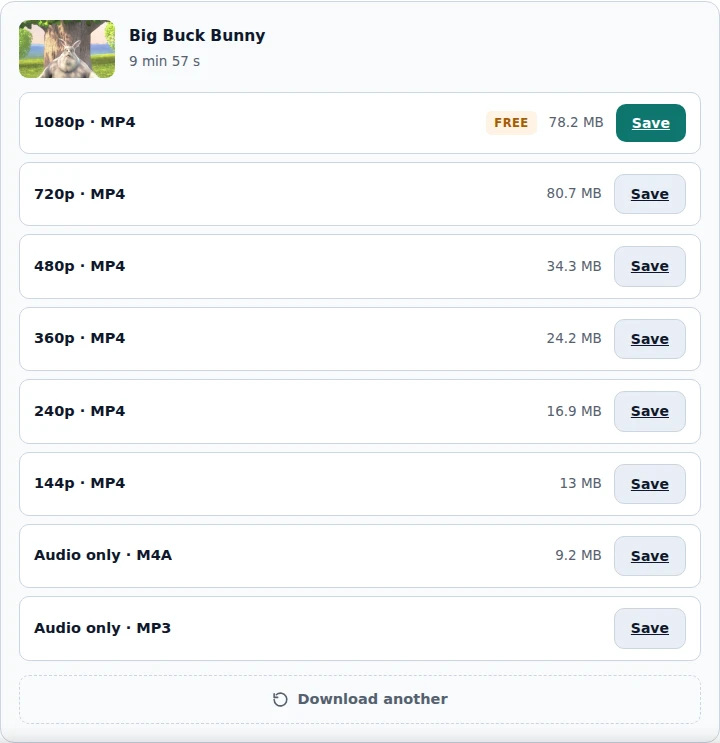
Platform video usually sits at or below the bottom of these bands — they compress harder than the general figures suggest, because bandwidth at their scale is the dominant cost. Our own measurement of a ten-minute 1080p video came to about 78 MB, well under the table, which tells you how efficient modern encoding has become.
Treat the ranges as orientation rather than specification. What matters is the relationship: halve the bitrate and you roughly halve the file, and at some point below that the picture visibly suffers.
Why content changes everything
The same bitrate produces wildly different results depending on what is happening on screen, and this is the part that surprises people.
Compression works by not repeating itself. A static shot of someone talking is almost identical frame to frame, so the encoder stores the difference and the difference is tiny. Confetti, rain, a crowd, water, a handheld camera in a forest: every pixel changes every frame and there is nothing to reuse.
- Easy to compress: talking heads, slides, screen recordings, animation with flat colour.
- Hard to compress: sport, dancing, fireworks, foliage, film grain, anything shot handheld.
This is why a lecture at 1080p can be a fraction of the size of a music video at the same resolution, and why the music video is the one where you see artefacts.
Variable bitrate, and why the number is an average
Modern encoding does not spend evenly. It uses more data on hard sections and less on easy ones, which is why a quoted bitrate is an average rather than a constant.
This is a good thing — a fixed budget would waste data on a static shot and starve a fast one. It also means the file size cannot be predicted exactly from bitrate times duration, only approximated.
It explains a common observation too: quality within a single video is not uniform. The calm sections look excellent and the one chaotic scene looks worse, because the encoder ran out of budget exactly where it needed most.
What starved bitrate looks like
Recognising the symptoms is more useful than knowing the number, because you can see these without inspecting anything.
Blockiness. Flat squares appearing in areas that should be smooth — skies, walls, shadows. The encoder ran out of budget and grouped pixels that are not actually the same.
Smearing in motion. Fast movement leaves a trail or turns mushy for a moment, then snaps back to sharp when the scene calms. Classic variable-bitrate behaviour meeting a scene it could not afford.
Banding. A gradient — a sunset, a studio backdrop — breaks into visible stripes instead of a smooth transition. Not enough data to describe the steps between shades.
Detail that comes and goes. Text or fine texture that is legible in one shot and mush in the next, because the surrounding motion consumed the budget.
All four are compression artefacts, and all four get worse when a video is encoded repeatedly. Seeing them in a downloaded file does not by itself mean a tool degraded it — the platform's own version may look identical, and comparing the two is the only way to know.
Where bitrate matters to you and where it does not
Practical translation, because the concept is only useful if it changes a decision.
It matters when: you are choosing between qualities and the sizes do not follow resolution; when a download looks worse than expected despite the right resolution; when you are re-encoding something and choosing a setting.
It does not matter when: you are picking a quality for phone viewing — screen size dominates; when the video is easy content, where even a low bitrate looks fine; when you are downloading a platform's own version, since you get whatever bitrate they chose.
That last one is the practical limit of the concept for most people. You cannot request a bitrate from a platform. You choose a resolution, and the bitrate comes attached — which is why real measured sizes are more useful than theory.
Audio has a bitrate too, and it works the same way
The concept transfers directly, with smaller numbers and a scale most people already have some intuition for.
Audio bitrate is measured in kilobits per second rather than megabits, and platform audio typically sits between 128 and 192 kbps. The trade is identical: more data means a more faithful description of the sound, and past a certain point nobody can hear the difference on ordinary equipment.
Where it differs is how much of the file it accounts for. In a video, audio is a small fraction of the total — a few megabytes against dozens. Which is why choosing audio only, when sound is all you need, cuts the download by an order of magnitude rather than a percentage.
It also explains something about the quality ladder. The audio stream is stored once and shared by every resolution, so the sound is the same whether you take 360p or 1080p. Only the picture changes — which is worth knowing when you are tempted to take a higher quality for a video you are mainly going to listen to.
Bitrate versus codec versus resolution
Three numbers that get confused constantly. Each does a different job.
| Term | What it decides |
|---|---|
| Resolution | How many pixels per frame |
| Bitrate | How much data describes them per second |
| Codec | How efficiently that data is used |
A better codec achieves the same quality at a lower bitrate — that is what ‘more efficient’ means. It is why a 1080p file in a newer codec can be smaller than a 720p file in an older one, which looks like a mistake and is not (the comparison covers it).
So high resolution with low bitrate is the worst combination: many pixels, insufficient data to describe them, and a picture that looks blocky despite an impressive label. It is exactly what upscaled video is, and exactly what ‘4K’ from a source that never had it produces.
The reverse combination is underrated: a modest resolution with a generous bitrate looks genuinely good. A well-encoded 720p file beats a starved 1080p one on any screen, which is worth remembering whenever the only thing you can compare between two options is the label.
Why we show size instead of bitrate
Our interface never mentions bitrate. It shows resolution, format and the size in megabytes, and leaving out the number this whole article is about was a deliberate choice worth explaining.
The first reason is that size is the decision people are actually making. Nobody stands in front of a download thinking about megabits per second. They are thinking about how much space is left on the phone and how long this will take on the hotel Wi-Fi — and megabytes answer both questions directly, while bitrate requires arithmetic with the duration first.
The second is that the bitrate platforms report is not always reliable in the way people would read it. It can be an average over a variable encode, or a nominal figure for the stream rather than what the file works out to. Presenting an approximate technical number next to a practical one invites the wrong comparison. The size we show is itself an estimate, marked with a ~ where we had to calculate it, but it answers the question people actually have.
The third is about what a number in an interface implies. Show bitrate and you suggest it is something to choose between, when the platform has already decided it for each rung of the ladder. There is no option where you take 1080p at a higher bitrate. Offering the information would imply an agency that does not exist.
Where it does surface, indirectly, is in the size figures themselves — and we show those even when they are confusing. Our own list sometimes shows 1080p barely smaller than 720p: the platform simply gave the two rungs different bitrates, and a more efficient codec can add to it. That looks like a bug in a quality list. It is bitrate and codec efficiency being visible, and hiding it by sorting differently would misrepresent what you will actually receive.
The one place we fix the number is audio: every MP3 is 192 kbps, a well-understood scale with an audible consequence. Different situation, different answer — covered separately.
Frequently asked questions
What is video bitrate?
How much data each second of video is allowed to use, in megabits per second. Resolution counts pixels; bitrate decides how well they are described.
Why do two 1080p videos look different?
Different bitrates. The same resolution with half the data available produces visibly worse results, especially in fast motion.
What bitrate is good for 1080p?
Streaming platforms typically use 5 to 8 Mbps, often less with efficient codecs. Our measured ten-minute 1080p file came to about 78 MB, which is well below that range.
Can I choose the bitrate when downloading?
No. You choose a resolution and the platform's bitrate comes with it. Bitrate is only yours to set when you re-encode a file yourself.
Is higher bitrate always better?
Up to a point. Beyond what the content needs, extra data adds file size with no visible improvement.
Why does quality vary within one video?
Modern encoding is variable — more data on hard scenes, less on easy ones. A chaotic scene can exhaust the budget where a static one does not.
VidKeep runs in your browser — paste a link, pick a quality, keep the file. No account, no app.
Open VidKeepLast updated: 2026-11-02. We revise our guides as the platforms change.