Guides
Downloading on Limited Data

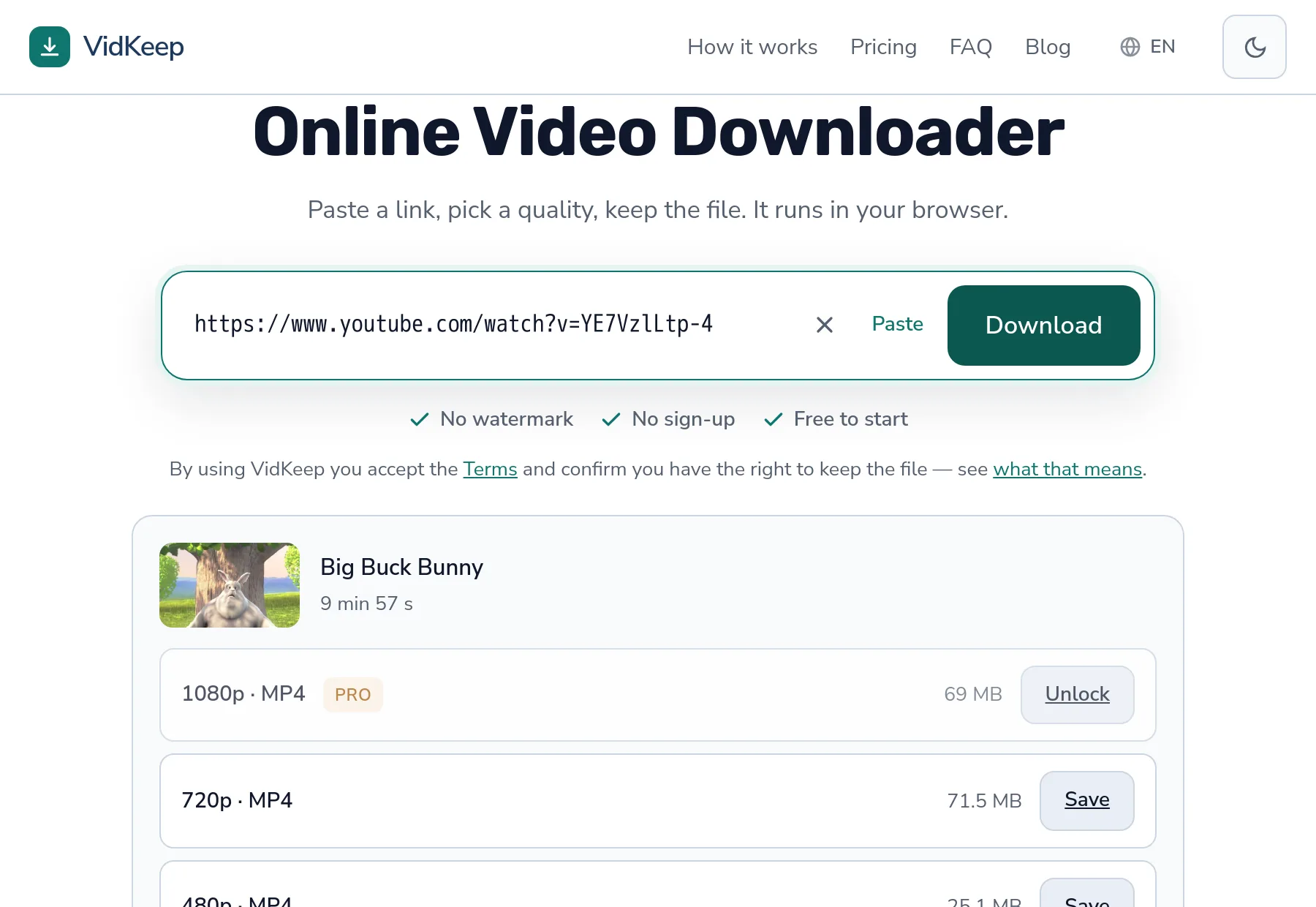
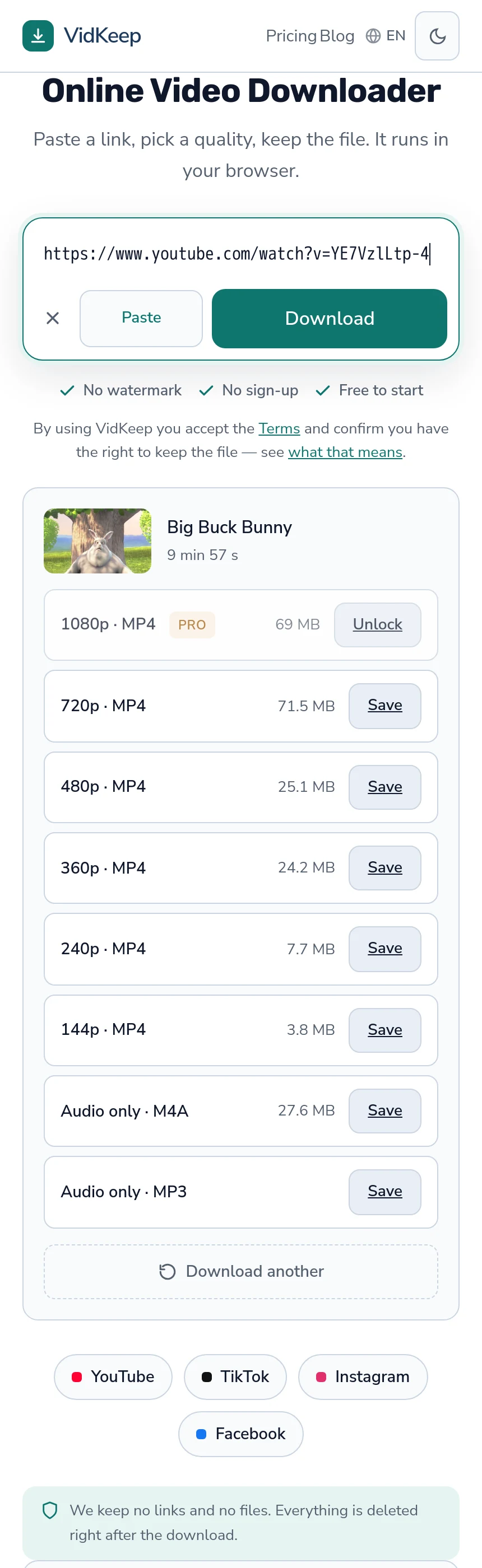
Choose by megabytes, not by resolution. At 480p a ten-minute video is around 25 MB against roughly 69 MB at 1080p — a third of the cost for a difference you will not see on a phone. Counterintuitively, downloading once uses less data than streaming the same video, because streaming re-fetches every time you rewatch.
What each quality costs in data
| Quality | Ten minutes | An hour |
|---|---|---|
| 1080p | ~69 MB | 400–700 MB |
| 720p | ~70 MB | 250–450 MB |
| 480p | ~25 MB | ~150 MB |
| 360p | ~24 MB | ~100 MB |
| Audio only | ~28 MB | 60–100 MB |
The first two rows are from an actual measurement and they look wrong: 1080p came in slightly smaller than 720p. That is a codec difference rather than an error, and it is the reason this article says to read the number rather than reason from the label — the explanation is here.
The practical consequence for a limited plan is that the quality ladder is not a reliable cost ladder. Two options can differ by a factor of three or by nothing at all, and only the figure next to each tells you which.
Why downloading beats streaming on a limited plan
This surprises people, and the arithmetic is straightforward.
Streaming fetches the video every time you watch it. Watch something three times and you have paid for it three times. A download costs the data once and every subsequent viewing is free.
Streaming also fetches more than you watch. Players buffer ahead, so abandoning a video after two minutes can easily have cost four minutes of data — and a video that autoplays while you scroll past costs data you never intended to spend at all.
The break-even is roughly one and a half viewings. For anything you expect to watch more than once, or to show someone, downloading is the cheaper option on a metered connection.
The comparison tilts further once you account for choice. Streaming picks a quality for you based on how the connection looks at that moment, and on a good signal it picks an expensive one. Downloading makes the decision explicit and lets you take 480p deliberately, which no player will do on your behalf.
Where the data goes unnoticed
- Autoplay in feeds. Videos playing as you scroll, muted, are still downloading. This is the largest invisible cost on most phones.
- Automatic quality selection. A player on a good connection picks a high quality without asking, which is the right choice on Wi-Fi and expensive on mobile data.
- Background app refresh. Apps updating content you never opened.
- Failed downloads. A transfer that dies at eighty per cent spent eighty per cent of the data and produced nothing — which is worth avoiding for the cost alone.
The last one is the argument for taking a lower quality on a poor connection rather than a high one. A completed 25 MB download beats a failed 69 MB attempt in every way.
Most phones expose a data usage screen broken down by app, and it is worth looking at once even if you never change anything. The distribution is rarely what people expect: the app someone assumes is responsible usually is not, and the actual answer is a feed that autoplays video, running in the background, for minutes at a time.
Roaming, and the bill nobody expects
Video is the fastest way to run up a roaming charge, and the mechanism is usually accidental.
A phone that silently reconnects and resumes an app in the background can spend meaningful data before anyone notices. On a plan charging per megabyte abroad, that is a real bill for content nobody chose to watch.
The reliable protection is to download before you travel, on real Wi-Fi, and turn data roaming off for video apps — planning a trip's viewing is covered here.
Hotel Wi-Fi inverts the usual habit in a useful way. It is generally adequate for downloading and poor for streaming, so saving in the evening what you want tomorrow works better than trying to stream it in the moment.
Choosing quality on a limited plan
- Read the size, not the label. The number is measured; the resolution is a category.
- Default to 480p on a phone. At arm's length the difference from 1080p is hard to see and the saving is real.
- Take audio only when the picture does not matter. Podcasts, talks, interviews — a fraction of the cost.
- Download on Wi-Fi when you can. Obvious, and worth building into the habit rather than deciding each time.
- Do not retry a failed download immediately. Each attempt spends data and rapid repeats can trigger rate limiting on top.
Step two deserves defending, because taking less than the maximum feels like settling. On a phone held at normal distance the panel cannot show most of what separates 480p from 1080p, so the extra data buys detail the screen discards. The same file on a television would be a different judgement entirely — matching quality to screen is where that reasoning lives.
And step five is the one that costs most when ignored. A failed transfer at 1080p spends the data and produces nothing; three of them spend more than the file was worth. On a limited plan, the cheapest download is the one that completes on the first attempt.
Wi-Fi that is not really free
Public networks solve the data problem and introduce different ones worth knowing about.
Captive portals re-authenticate. Many hotel and airport networks drop connections periodically to make you log in again, which kills a download in progress. A large file on such a network frequently fails at the same point every time, which looks like a server problem and is the network.
Shared bandwidth collapses at peak. An airport network at eight in the morning is not the connection you tested at six, and video is the first thing to suffer.
Some networks filter media. Corporate and public Wi-Fi occasionally blocks large media transfers by policy, which produces a failure identical to every other — and no setting overrides it.
The practical answer on any of these is a smaller quality. Not because the data costs money, but because a shorter transfer has less opportunity to be interrupted.
Slow connections are a different problem
Limited data and slow data overlap but are not the same, and the responses differ.
On a slow connection the constraint is time and reliability: a large file takes long enough to be interrupted, so a smaller one is more likely to arrive at all. Taking 480p is a completion strategy rather than an economy.
On a limited connection the constraint is total volume, and the same advice applies for a different reason.
Where they diverge is patience. On a slow but unmetered connection, a large download left running is fine. On a metered one, size is the whole question regardless of how long it takes — the speed side is covered separately.
There is a third variant worth naming because the advice inverts: a fast connection with a hard cap. Here nothing feels constrained — downloads complete in seconds, quality is tempting, and the allowance disappears without any of the friction that would normally warn you. Most people who exhaust a data plan do it on a good connection rather than a bad one.
The defence in that case is arithmetic rather than experience. An hour of 1080p is several hundred megabytes whether it arrives in two minutes or twenty, and the only signal you get is the number next to the quality — which is why reading it becomes a habit worth having before the plan runs out rather than after.
Why the size is shown before you choose, and where it is blank
Every quality in our list carries the file size the platform reports, shown before you commit. For someone on a limited plan that is the difference between a decision and a gamble, and a surprising share of this category reveals the number only after the file has arrived.
That pattern is easier to build, because the size does not have to be fetched or reasoned about. It is also precisely useless for the person this article is about, who is deciding whether a video fits in what remains of the month. Choosing between 480p and 1080p is a data decision before it is a quality one.
We show the figures even when they undermine the tidy story. Our own list regularly displays 1080p as smaller than 720p, which looks like a bug and is codec efficiency being visible. Sorting the list by size or dropping the confusing row would look better and would misrepresent what you will receive.
There is one place the number is missing and we do not fill it. Some platforms report no size — TikTok routinely does — so those rows show a Save button with a blank beside it. Calculating an estimate from bitrate and duration would be simple and usually close, and an estimate that is occasionally wrong is worse than an honest gap for someone counting megabytes.
The same reasoning is why audio shows a real figure rather than being called small. On the ten-minute video we measured, the audio track came to 27.6 MB against 69 MB for 1080p — a genuine saving, and not the order of magnitude that vaguer language would imply. Someone budgeting data deserves the number, including when it is less impressive than the adjective would have been.
We also pass through the declared content length whenever the platform provides it, which is what gives your browser a progress bar and lets it recognise a transfer that ended early. On a metered plan that matters twice over: you can see what is being spent, and a download that fails is identifiable rather than silently repeated.
Frequently asked questions
How much data does downloading a video use?
Around 25 MB for ten minutes at 480p and about 69 MB at 1080p. Read the figure shown next to each quality rather than reasoning from the resolution.
Is downloading cheaper than streaming?
Yes if you watch more than once. Streaming re-fetches every time and buffers ahead, so the break-even is roughly one and a half viewings.
Why is 1080p sometimes smaller than 720p?
Different codecs. The higher rung often uses more efficient encoding, so the quality ladder is not a reliable cost ladder.
What uses data without me noticing?
Autoplay in feeds is the largest invisible cost, followed by automatic quality selection and failed downloads that spent the data and produced nothing.
How do I avoid roaming charges?
Download before travelling on real Wi-Fi and turn data roaming off for video apps. Hotel Wi-Fi is better for downloading than for streaming.
What quality should I choose on a limited plan?
480p on a phone. The difference from 1080p is hard to see at arm's length and the saving is around two thirds.
VidKeep runs in your browser — paste a link, pick a quality, keep the file. No account, no app.
Open VidKeepLast updated: 2026-08-01. We revise our guides as the platforms change.