Guides
When You Only Need the Sound

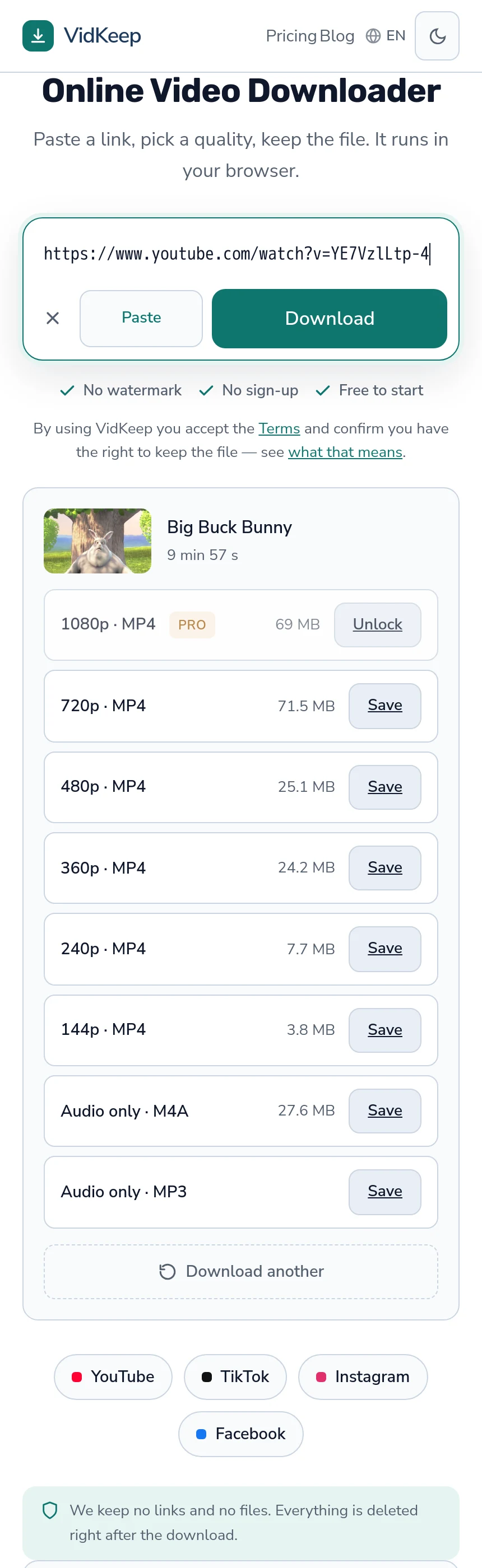
On a ten-minute video we measured, the audio track is 27.6 MB against 82.1 MB for the 1080p file — roughly a third, and on a two-hour recording the gap is gigabytes. If you are going to listen rather than watch, the picture is pure cost: storage, transfer time, and battery your phone spends decoding frames nobody sees.
What you actually save
| What you take | Ten-minute video | Roughly |
|---|---|---|
| 1080p video | 82.1 MB | Full picture and sound |
| 720p video | 84.8 MB | Same content, different codec |
| 360p video | 25.3 MB | Watchable on a phone |
| Audio only (M4A) | 27.6 MB | Sound, unchanged |
Measured on our own service on 2 August 2026 — one video, one server, so treat them as proportions rather than promises — the wider size picture.
The interesting row is the last one. Audio is comparable to the 360p file and a third of the 1080p one, and unlike 360p it loses nothing you were going to use.
The proportion holds better than the absolute numbers do. Audio is usually somewhere between a quarter and a third of a 1080p file, because a music or speech track sits around 128 kbps while the picture eats the rest — which is why the saving grows with duration rather than staying flat.
Two hours of a conference talk is the case where this stops being an optimisation and becomes the difference between a file that fits on the phone and one that does not.
The cases where audio is the right answer
- Interviews, podcasts and talks. A recorded conversation is a recorded conversation; the video is two people at a table.
- Music. The point is the track, and a static image or a performance you will not watch again is the rest of the file.
- Lectures you are revising from. Unless the slides matter, and if they do, take the video once and the audio for repeat listening — the study case.
- Anything you will listen to while doing something else. Commuting, walking, cooking — the screen is off regardless.
- A metered or slow connection. A third of the bytes is a third of the wait — where every megabyte counts.
The common thread is not the content type but your intention. If you cannot picture yourself looking at the screen, the screen is overhead.
There is a second thread worth naming: repetition. Anything you will play more than once is usually something you listen to on the later plays, even if you watched it the first time — which makes audio the right format for the copy you keep.
When audio only is the wrong call
The failure mode is discovering afterwards that the picture carried information.
Anything demonstrated rather than described. A tutorial where the presenter says ‘click here’ is useless as sound, and a surprising number of explanations are less verbal than they feel while you are watching them.
Slides, diagrams and code. Even a talk that is mostly speech usually has three minutes that only exist on screen.
Anything you might reuse. A clip you may want later should be taken as video, because you cannot add the picture back — the editing case.
Anything that might disappear. If this is your only copy of something, take the complete thing while it exists.
The test that works: ask what you would do if the audio turned out to be useless. If the answer is ‘download it again’, audio-only is a safe experiment. If the answer is ‘the video is gone by then’, it is not.
M4A or MP3
Two audio options and the difference is smaller than the internet suggests.
M4A is the platform's own track, copied out unchanged. Nothing is re-encoded, so it is exactly the audio the video had, and it is usually the better technical choice.
MP3 is converted, which means one generation of loss, and in exchange it plays on everything — car stereos, older players, cheap devices that have never heard of M4A. That compatibility is a real feature, not a legacy quirk.
Practical rule: M4A unless you know the device you are targeting, MP3 when you do and it is fussy — what the bitrate numbers mean.
Neither improves the source. A recording that was compressed to 128 kbps by the platform stays a 128 kbps recording, whichever container you put it in — why the ceiling is upstream.
The bitrate question people ask next — 128 against 320 — is mostly answered by the source. Converting a 128 kbps platform track to a 320 kbps MP3 produces a larger file containing exactly the same information, which is the most common way people waste storage on audio.
Where the source is genuinely high quality — a music platform serving a good stream — the higher setting is worth taking, and the difference is audible on decent headphones and inaudible on phone speakers.
Battery, storage and the things nobody measures
Size is the obvious saving and not the only one.
Some of the rest matter more day to day than the megabytes do, and none of them show up in a comparison table.
Decoding. Playing video keeps a decoder and a screen busy; playing audio keeps neither. On a long journey the difference in battery is the difference between arriving with a phone and arriving without one.
Backup and sync. A library of audio files moves between devices and into backups without thought. A library of videos is the thing that fills the cloud allowance — keeping a library manageable.
Attention. Less measurable and probably the biggest one: an audio file is something you can listen to while doing something else, and a video is not.
Playback control. Podcast and music apps do things video players generally do not — remembering position across a whole library, queueing, playing with the screen locked, and surviving a phone call without losing your place. Putting a talk into that ecosystem as audio is often a better experience than the video ever was.
Transfer time. A third of the bytes is a third of the wait, and on a hotel or mobile connection that is the difference between downloading three talks before a flight and downloading one.
Taking both
- Take the video once if there is any chance the picture matters.
- Take the audio as well for the listening copy — it is small enough that the duplication costs almost nothing.
- Name them so you can tell them apart before you have forty files with similar names.
- Delete the video once you know you never opened it. Most of the time you will not, and that is the useful signal for next time.
On our free tier this costs one of your ten daily downloads for the video and, for the platform's own audio track, nothing at all — the M4A option is a direct link rather than an assembly, so it is not counted.
Which makes the both-copies habit cheaper than it sounds. The expensive half is the video you were taking anyway, and the listening copy rides along for free — why the two routes differ.
One caveat on the free M4A: it exists only where the platform stores audio separately. Sites that serve a single finished file have no separate track to link to, so there the audio route is the MP3 conversion and it does count. That is a property of the platform rather than a choice of ours.
If you are unsure which case you are in, the quality list answers it: an ‘Audio only’ row with a size next to it means the separate track exists.
Why our audio options are not all the same thing
The quality list shows more than one way to end up with sound, and they are technically different operations with different costs to us. Explaining that is more useful than pretending they are interchangeable.
Audio only, M4A is the platform's own audio stream. Platforms store video and sound separately above the lowest quality, which means the audio already exists as its own file and we hand you a direct link to it. Nothing passes through our server, nothing is re-encoded, and the result is byte-for-byte what the platform holds — why the streams are split.
MP3 is a conversion. We fetch the audio and re-encode it, which is real work on a single shared processor, so it is counted against your daily allowance where the M4A is not. That asymmetry is not a pricing trick — one costs us a redirect and the other costs us CPU time.
There is also a case that surprised us. On platforms that serve a single finished file — TikTok, X, Twitch, Snapchat — there is no separate audio stream to link to, so for a while our interface showed no MP3 button at all on those sites. The conversion worked perfectly if you called it directly; the button was simply hidden by a condition that checked for a separate audio track. We found it on 2 August 2026 while checking claims for these articles, verified the conversion on all four platforms — 0.58, 1.08, 1.44 and 0.46 MB, all valid audio — and fixed the condition.
That is a small feature restored to four platforms, and it is the second thing this round of fact-checking found that no error log would ever have reported. Nothing failed. A button was absent, which looks identical to a feature that does not exist, and only someone writing down what the service does would notice the gap between the two.
The honest summary of our audio support: the M4A route is the good one and it is free because it is cheap for us; MP3 is there for compatibility and costs a download because it costs us processing; and neither can be better than what the platform stored.
Frequently asked questions
How much smaller is an audio-only download?
On the ten-minute video we measured, audio was 27.6 MB against 82.1 MB for 1080p — roughly a third. On long recordings the gap is gigabytes.
Is M4A or MP3 better?
M4A is the platform's own track, copied unchanged. MP3 is converted, so there is one generation of loss, in exchange for playing on almost anything.
Does audio-only lose quality?
The M4A does not — it is the same audio the video contained. MP3 re-encodes, which is a small loss most people cannot hear at higher bitrates.
Does an audio download count against the free limit?
The platform's own M4A does not, because it is a direct link. MP3 does, because converting is real processing on our side.
When should I take the video instead?
Whenever the picture carries information — demonstrations, slides, diagrams — or when this might be your only copy of something.
Can I take both?
Yes, and it is often the right answer: the video once in case the picture matters, and the audio as the copy you actually listen to.
VidKeep runs in your browser — paste a link, pick a quality, keep the file. No account, no app.
Open VidKeepLast updated: 2026-08-02. We revise our guides as the platforms change.