Guides
What Happens to Your Link

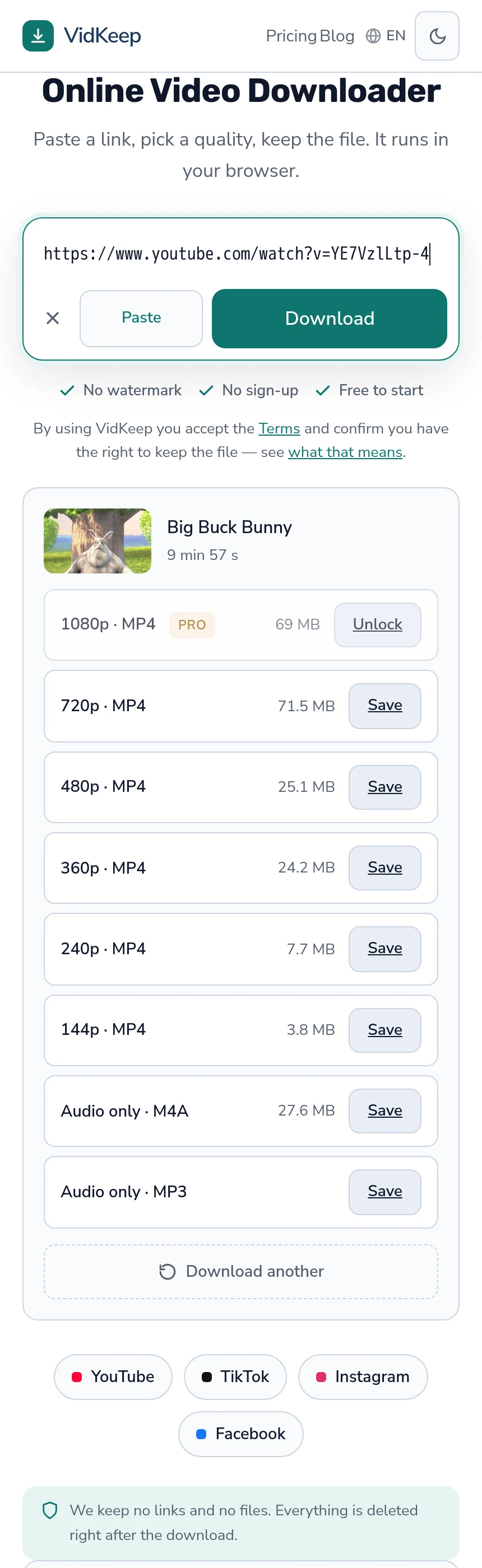
Between pasting and saving, four things happen: your link goes to a server, that server asks the platform what exists, the answer comes back as a list of qualities, and the file you pick is fetched and passed to you. The link leaves your device in every web-based tool — what varies is what is done with it afterwards.
Step one: the link goes to a server
This is the part people are most often surprised by, and it is unavoidable in a web tool.
Your browser cannot fetch a video from a platform's servers directly. Those servers refuse cross-site requests from arbitrary pages — a deliberate protection — so a page has no way to read the video itself. Something else has to make the request, and that something is a server.
So the link travels. Which raises the only question that matters here: what does the service do with it? Storing links in readable form builds a record of what people watch, and the difference between services is whether that record exists at all.
Step two: asking the platform what exists
The server makes a request to the platform, as a logged-out visitor, and receives a description of what is available — resolutions, formats, sometimes sizes.
This is the step that fails most often, and the reasons have nothing to do with the tool. The platform may refuse a datacentre address outright, throttle it after too many requests, or answer that the content needs an account — which is why supported-site lists mean so little.
Nothing is downloaded at this stage. The exchange is a question and an answer about what the video contains, and it is why a list of qualities appears in a second or two while the file itself takes longer. It is also why a tool can tell you a video is private or removed without having attempted to fetch anything.
Step three: the list you are shown
What comes back from a platform is messier than what you see. A single video can report dozens of variants — the same resolution several times over with different codecs, frame rates and audio pairings.
A tool reduces that to something choosable. Ours keeps one option per resolution step, preferring streams that already carry audio, then MP4, then H.264 for compatibility. That reduction is opinionated by necessity: four identical-looking rows labelled 1080p would help nobody.
It is also where information can be quietly lost. A filter that discards everything produces an empty list, and a tool that then reports ‘no formats available’ is describing its own filtering rather than the video — a failure we have shipped twice and fixed twice.
The practical check is the platform's own quality menu. If it offers something the downloader does not, the difference is the tool.
The reduction also decides things you are never asked about. Frame rate is the clearest case: 30fps and 60fps variants of the same resolution collapse into one row, so whichever the tool's preferences select is what you get. For most people that is invisible and correct; for someone matching footage to an editing project it is a decision made on their behalf — which is why that article exists.
Every downloader makes these reductions. What differs is whether the tool tells you it is making them, and a list presented as though it were simply what the platform holds is already a small misrepresentation.
Step four: fetching and passing on the file
What happens when you choose a quality depends entirely on what the platform stores, and there are two quite different paths.
A finished file — TikTok, reels, most short video — can be passed straight through. Nothing is assembled and the download starts immediately.
Separate video and audio streams — YouTube above 360p — must be fetched and joined before there is a file at all. That is why higher qualities take a few seconds longer, and why some tools hand you a silent video instead: skipping the join is free — the mechanics are here.
Either way, the file passes through the server on its way to you. It has to: a browser will play a direct video link rather than saving it, and only a response marked as an attachment gets saved — a header nobody can add to another company's server.
The whole process, in one table
| Step | What moves | Typical time |
|---|---|---|
| 1. Link submitted | The address, to a server | Instant |
| 2. Extraction request | A request to the platform, with headers a browser would send | 1–3 seconds |
| 3. List built | Nothing — the answer is processed | Instant |
| 4a. Ready file | Streaming straight through | Transfer time only |
| 4b. Assembly needed | Two streams fetched, joined, streamed out | Seconds to minutes |
Steps one to three are the same for every video. Step four is where the difference between platforms shows up, and where nearly all the processing cost sits — which is also why free tiers are usually drawn around it rather than around the number of links you submit.
Nothing in this process involves your browser talking to the platform. From the platform's side the entire interaction is with a server, and your own address is never part of it — which is a privacy benefit and the reason region blocks apply to the server's country rather than yours.
What you should be asking any tool
- Is the link stored, and in what form? A hash serves every legitimate diagnostic purpose; readable text builds a record.
- Are files kept after sending? There is no technical reason to keep them, and a cache of downloads is a library of requests.
- How many trackers load on the page? Open the browser's network view. Third-party scripts see the page regardless of the policy text.
- Is the video re-encoded? Re-encoding costs quality for no benefit on a download, and the size gives it away.
Point three catches more than the others combined, and it takes ten seconds. A privacy policy is a promise; the network tab is a measurement, and the two disagree more often than anyone would like.
Where a local tool differs
Everything above describes a web service. A program on your own machine works differently, and the difference is worth understanding rather than assuming one is simply better.
A local tool makes requests from your own connection, so your link never goes to a third party and the platform sees a home address rather than a datacentre — which sometimes reaches content a web service cannot. That is the strongest privacy position available.
The costs are installation, updates, and a program with your account's permissions on your machine. For occasional use that is a lot of trust for a small task; for regular or bulk work it is clearly the right trade — the comparison in full.
Neither is universally correct. What is wrong is a web tool implying it works like a local one, or a local one implying it needs the permissions a web page never asks for.
Browser extensions sit awkwardly between the two and are worth separating out. They run locally, which sounds like the private option, and to find a video on a page they need permission to read every page you visit — including your email and your bank. That is a broader grant than either a web page or a standalone program requires, in exchange for convenience rather than capability.
The general rule that falls out of all this: judge a tool by what it is structurally able to see, not by what it promises. A page sees what you paste. A program sees what you install it with. An extension sees everything, and the permission outlives whoever wrote it.
Our version of those four steps, specifically
Since the article asks you to interrogate any tool, here are our own answers, and they are checkable against the rest of this blog.
The link. It reaches our server and is written down only as a SHA-256 hash, sixteen characters, one-way. That is enough to tell one broken video from forty broken ones and not enough to reconstruct anything. We also turned off the web server's standard access log, because it records the full request line — which on this service contains the video address in readable form. Running without it is genuinely harder to debug, and keeping a file of everyone's links for occasional convenience was the wrong trade.
The platform request. Made as a logged-out visitor from a single datacentre address in one country. No accounts, no cookies, no proxy rotation — the parameter exists in the code and nothing sets it in production, because rotating addresses to defeat blocks is a different product than the one we want to run.
The list. One option per resolution, plus audio. We show the platform's own size figure next to each, including when it is counterintuitive — 1080p is frequently smaller than 720p — and a blank where no size is reported rather than an estimate that would look like a measurement.
The file. Streamed through in 64 KB chunks and never written to our disk, except for assembled qualities, which exist in a temporary folder for as long as the merge takes and are then deleted. Nothing is cached, so a popular video is fetched afresh every time — an optimisation we decline because a cache keyed to what people request is a record of requests wearing a different name.
None of that makes us the most private option available; a local open-source tool is, and we say so. It makes us a web service whose behaviour you can check against its own documentation, which is a lower bar than it should be in this category — the full field list is published.
Frequently asked questions
Does my link leave my device?
Yes, with any web-based tool. Browsers cannot fetch video from platform servers directly, so a server has to make the request.
Why does the file pass through the service?
Because a browser plays a direct video link rather than saving it. Only a response marked as an attachment gets saved, and that header cannot be added to another company's server.
Why does the quality list take a moment to appear?
The server is asking the platform what exists. Nothing is downloaded at that stage — it is a question and an answer.
Why do higher qualities take longer?
Above 360p, YouTube stores video and audio separately, so both must be fetched and joined before a file exists.
How do I check a tool's privacy claims?
Open the browser's network view and count third-party scripts. A policy is a promise; the network tab is a measurement.
Is a local program more private?
Yes — your link never goes to a third party. The cost is installing software with your account's permissions, which for occasional use is a lot of trust for a small task.
VidKeep runs in your browser — paste a link, pick a quality, keep the file. No account, no app.
Open VidKeepLast updated: 2026-08-01. We revise our guides as the platforms change.