Troubleshooting
How Long Should This Take?

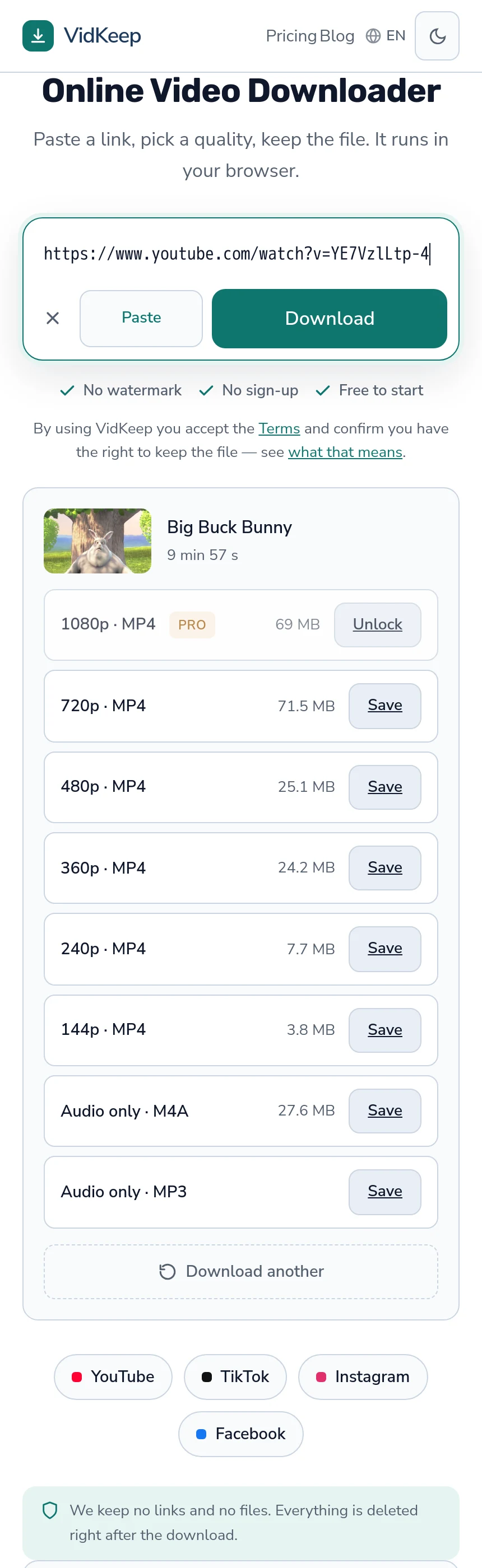
Two things happen and only one of them is your connection. Reading what qualities exist takes a second or two. Then a ready file transfers at whatever speed you have, while a file that needs assembling is fetched and joined first. Our own measurements on a ten-minute video: 360p in 12 seconds, 720p in 27, 1080p in 23 — and the order is not a mistake.
What we measured
| Quality | Time | File |
|---|---|---|
| 360p | 12 seconds | 25.3 MB |
| 720p | 27 seconds | 84.8 MB |
| 1080p | 23 seconds | 82.1 MB |
1080p finishing before 720p looks wrong and is not. The higher rung on this video uses a more efficient codec, so it is a slightly smaller file — and a smaller file transfers faster regardless of what the label says — the codec explanation.
These are end-to-end figures from a server with a good connection, which makes them a floor rather than a promise. On your side the transfer is bounded by your own bandwidth, and that is usually the larger share of the wait.
Where the time actually goes
Three phases, and they have different characters.
Reading the video. One to three seconds. The service asks the platform what exists; nothing is downloaded yet. This is why the quality list appears quickly while the file takes longer — the whole path.
Assembly, above 360p. Where video and audio are stored separately, both are fetched and joined before there is a file at all. On a ten-minute video that is seconds; on a two-hour one it is minutes.
The transfer. Your bandwidth, your distance from the server, and whatever else your connection is doing. This dominates on anything large.
360p skips the middle phase entirely, because platforms keep it as one finished file. That is why it feels instant and everything above it does not.
What makes it slower than it should be
- Long videos. Assembly scales with duration, so a two-hour recording is a different proposition from a ten-minute one — where our limits bite.
- Shared connections. Office, campus and hotel networks at peak time are not the connection you tested at six in the morning.
- A VPN. Traffic takes a longer encrypted path, so transfers are usually slower — what a VPN does and does not do.
- Rate limiting. After a run of downloads, platforms answer more slowly before they refuse outright, and that slowdown is the warning — the escalation.
- Our own queue. One processor means assemblies wait for each other when several people arrive at once.
Slow or stuck?
The useful distinction, and it takes no tools.
A slow download makes progress. The number climbs, unevenly, and the estimate wanders — all normal. A stuck one stops advancing entirely, and past a minute of no movement it is not going to resume.
For a stuck transfer, the causes are the ordinary ones: the connection changed, the device suspended the browser, storage ran out, or a server-side limit was reached — the full list.
Retrying immediately is the instinct and rarely the answer. If it failed at the same point twice, something structural is wrong; if it failed at different points, that is your connection and a lower quality will finish where a higher one did not.
Making it faster
- Take a lower quality. The largest single lever, and on a phone the difference is hard to see anyway.
- Read the size rather than the label. Two options can differ threefold or not at all, and the number is the one that predicts the wait.
- Take audio only when the picture is not the point. Seconds instead of minutes.
- Do one at a time. Parallel downloads share the same bandwidth and invite rate limiting on top.
- Keep the screen on, on a phone. Background suspension stops transfers and looks like slowness.
What does not help is trying a different service. They all fetch from the same platforms at the same speeds, and the variable that matters is the file size you chose.
When waiting is the right answer
Some slowness is temporary and resolves on its own, which is worth recognising before changing anything.
A newly uploaded video. Higher qualities are still processing, and the platform is serving what exists — why the ladder fills in over hours.
Throttling after heavy use. Minutes rather than hours, and retrying extends it.
A busy queue on our side. Assemblies are serialised, so arriving during a rush means waiting for the ones ahead.
In all three, ten minutes of patience beats any amount of retrying — and retrying makes the second one actively worse.
These timings changed while the article was being written
Measuring for this page found two faults in our own service, which is worth recording because it is a good illustration of why numbers beat assumptions.
The first: a 720p download of a ten-minute video was arriving as 104 MB while the quality list showed 71.5 MB. The cause was the audio selector asking for the best available m4a — which on that video meant 5.1 surround at 388 kbps, 27.6 MB, instead of stereo at 129 kbps and 9.2 MB. We were paying for 19 MB of extra bandwidth on every assembly, and handing people surround sound their phone would fold back to stereo anyway.
The second was worse. Our format preference asked for H.264 at or below the requested height, and H.264 first. On a video whose 1080p exists only in a newer codec, that matched the 720p H.264 stream instead — so choosing 1080p silently produced a 720p file. Since 1080p is the paid tier, some people were paying for a resolution they did not receive.
Both are fixed. Audio now prefers stereo, and the selector tries the exact requested height before falling back — verified on the live service, where 1080p now returns 1920×1080 and the 720p file dropped from 104 MB to 84.8 MB.
Neither would have surfaced from logs. Nothing failed, no error was recorded, and every download completed successfully — it simply completed with the wrong audio track or the wrong resolution. The only thing that found them was timing a download for an article and noticing the file did not match the number we had shown.
The timings in the table above are from after the fix, which is why the 720p figure is what it is. The earlier measurement — 104 MB in 28 seconds — was a real download of a file nobody should have received, and publishing the corrected number alongside the story seemed better than quietly replacing it.
It also sets an expectation worth stating: these numbers have a date on them, they came from one server and one video, and they will drift as platforms change what they store. A measurement is useful because it can be checked, not because it is permanent.
Frequently asked questions
How long should a video download take?
On our measurements, a ten-minute video took 12 seconds at 360p and around 25 seconds at 720p and 1080p. Your own bandwidth is usually the larger share of the wait.
Why does 360p feel instant?
Platforms keep it as one finished file, so nothing needs assembling. Higher qualities are fetched as separate streams and joined first.
Why did 1080p finish before 720p?
Because it was a smaller file. The higher rung used a more efficient codec, and size predicts transfer time rather than resolution.
Is it slow or stuck?
A slow download still makes progress, unevenly. If nothing has moved for a minute, it is stuck and will not resume.
Would a different service be faster?
No. They fetch from the same platforms at the same speeds. The variable that matters is the file size you chose.
Why does a long video take disproportionately longer?
Assembly scales with duration, so a two-hour recording spends minutes being joined before the transfer even begins.
VidKeep runs in your browser — paste a link, pick a quality, keep the file. No account, no app.
Open VidKeepLast updated: 2026-08-01. We revise our guides as the platforms change.