Guides
Captions, Comments and What Survives

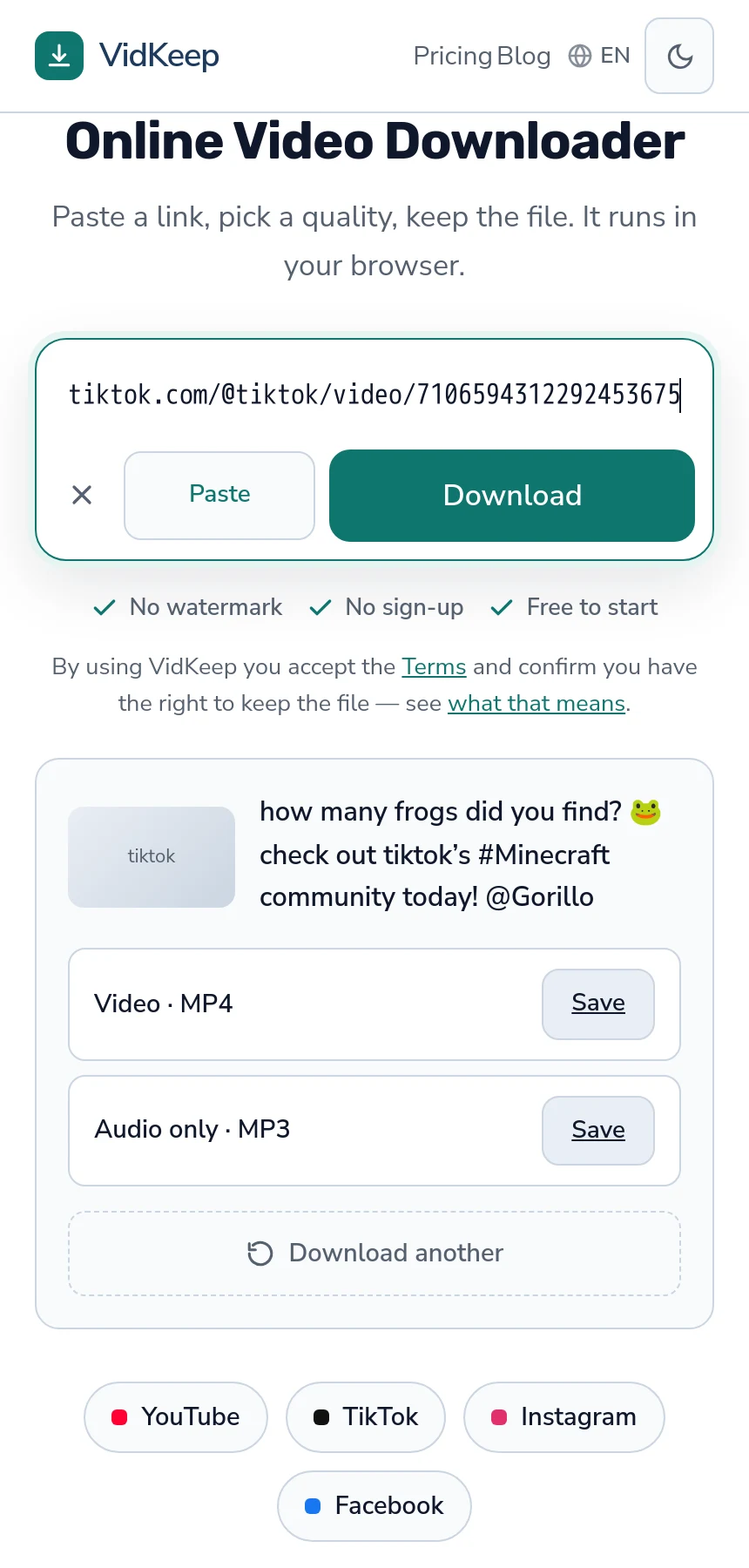
The caption comes out; the comments do not. Tools that read a post retrieve its text, author, duration and counts — we checked, and the caption arrived complete with hashtags and emoji. Comments returned empty. If a discussion under your post matters, screenshots are the only reliable route, and it has to happen before anything is deleted.
What actually comes back
| Element | Retrievable |
|---|---|
| Caption text, with hashtags | Yes |
| Account name | Yes |
| Duration | Yes |
| Like and comment counts | Yes — the numbers, not the comments |
| The comments themselves | No — empty in our test |
| Who liked or shared it | No |
The distinction in the fourth row catches people. Knowing a post had four hundred comments is not the same as having them, and the count is what survives — a number with nothing behind it.
None of this travels inside the video file either. A downloaded MP4 contains picture and sound; the caption is not in it, and neither is anything else from the page — the same problem across platforms.
Why comments are the hardest part
Comments are loaded separately from the post, in pages, as you scroll. They are not part of what a link resolves to, which is why a tool reading the post gets an empty list rather than a truncated one.
They also change constantly. People delete their own, the creator hides some, the platform removes others, and the ordering shifts by engagement. A capture of comments is a snapshot of one moment rather than a record of a thread.
The practical answer is unglamorous: screenshots. For a discussion that matters — a correction, a permission granted in a reply, something you may need to show — a screenshot at the time is the only version you will have.
This is worth doing immediately rather than eventually. Comments disappear with the post, with the commenter's account, and sometimes on their own.
Platform data exports do not close this gap either. They cover what you wrote — your posts, your captions, your own comments elsewhere — and not what other people wrote to you. That asymmetry is consistent across platforms and is the single most common surprise for anyone archiving an account they are about to close.
Saving the caption properly
- Copy it from the post before you close the app. It is text; selection works.
- Paste it into a file next to the video, named the same way.
- Add the link and the date at the top — the two things you cannot reconstruct later.
Captions carry more than they look like. Hashtags record how a post was positioned, mentions record collaborations, and the sound credit identifies music you may need to find again. All of it is a line of text and none of it is in the video.
For your own posts this matters more than the video does. TikTok's own data export includes captions, which is another argument for requesting it before you need it — the order of operations is here.
What the file name gives you, and why it is not enough
A downloaded video is named after the post's caption, which sounds like the problem is already solved.
It is not, for two reasons. File names have length limits and get truncated, so a long caption arrives cut off. And characters that are illegal in file names — slashes, colons, some emoji — are stripped or replaced, so the text is altered rather than preserved.
It is a reasonable label and a poor archive. A separate text file keeps the caption intact, and it costs one paste while the post is still open in front of you.
There is a related quirk worth knowing: a caption made entirely of emoji or non-Latin script can reduce to almost nothing after that stripping, which is why some downloads arrive with a generic name. The file is fine; the name was unrepresentable.
For creators archiving their own posts
- Request the data export first. Free, takes days, and includes text the video files do not.
- Screenshot conversations you rely on. Permissions, corrections, anything you might need to demonstrate.
- Keep the sound credits. Which track you used is in the caption area, not in the file, and it matters if you ever rebuild the post.
- Record the posting date. Nothing in the video carries it, and it becomes impossible to establish once the post is gone.
The pattern across all of these is that text is easy to save and easy to forget, and it is the part that cannot be recovered. Videos can sometimes be found again through a repost; a caption cannot.
There is a habit that removes most of this work: write the caption somewhere before posting it. A document of your own captions costs nothing to maintain, survives anything that happens to the account, and doubles as a record of what you have already said — which is more useful than it sounds after a couple of hundred posts.
The same applies to the video itself. Whatever you download back is the platform's re-encoded version, so keeping your own export before uploading is the only way to have the good file — the general problem for creators.
What a screenshot actually preserves
Since screenshots are the only route for comments, it is worth being deliberate about them rather than treating them as a fallback.
Capture the context, not just the text. A comment without the post above it or the username beside it proves very little later. Scroll so both are in frame.
Include the date if it is shown. Platforms display relative times — '3d' rather than a date — so note the day you captured it, since the screenshot itself will not say.
Do it while the thread is live. A deleted comment leaves no gap and no trace; the conversation simply reads differently afterwards, and nothing indicates that anything was removed.
Capture replies as well as the top comment. A thread frequently only makes sense with both, and the reply is the part that disappears first when someone reconsiders what they wrote.
Keep them with the video, not in the camera roll. Screenshots scatter among thousands of photographs within a week. A folder per post is the difference between an archive and a search you will never run.
Scraping comments at scale: don't
Tools exist that collect comments in bulk, and they are worth avoiding for reasons beyond whether they work.
Comments are written by identifiable people who posted them in one context. Collecting them into a dataset moves them into another, and the people involved neither know nor agreed. That is a privacy question rather than a technical one, and it does not go away because the text was publicly visible.
Platforms also treat bulk comment collection as scraping and defend against it — rate limits, blocks, and terms that prohibit it explicitly. Tools promising otherwise are operating against those terms, which is a fragile foundation for anything you plan to rely on.
For research with a genuine need, the sanctioned route is a platform's own research programme or API access, which exists precisely because the alternative is a mess for everyone.
The same reasoning applies to your own posts, oddly enough. Screenshotting a supportive reply to keep is unremarkable; assembling every comment anyone ever left you into a searchable file is a different artefact, and the people who wrote them were talking to you in a thread rather than contributing to a database.
That distinction is worth holding onto because the technical difficulty is identical. Nothing stops a determined person from collecting comments by hand, and the reason not to is not that it is hard.
What we show, what we discard, and why the caption is not saved
Our result panel displays the caption above the download options, and nothing else from the post. That is a narrow slice of what the underlying tooling returns, and the narrowing was deliberate.
When we read a TikTok post, the response contains the caption, the account name, the duration, like and comment counts, and various platform identifiers. We keep the caption and the duration. Everything else is discarded before it reaches you or any log.
The caption is shown because it answers the only question that matters before downloading: is this the right video. A caption and a duration confirm it in a glance. Counts, account names and identifiers answer nothing about that and would fill the space the quality options need.
They are also discarded rather than merely hidden, which is the part worth stating. Our event log records a hashed link, the platform, the chosen quality and a visitor hash that changes with the network — not what the video was called, who posted it, or how popular it was. Keeping that would build a record of what people save, and a record that exists is a record that can be demanded or leaked — the full field list is published here.
Which is also why we do not offer to save the caption as a file alongside the video, reasonable as that sounds. It would mean generating something from post content on our side, and the honest version of that feature is two seconds of copying and pasting on yours. The text is already in front of you in the app; a service is not what stands between you and keeping it.
The general rule we apply is that a service should hold the minimum that lets it do its job. Fetching a video needs a link, a platform and a chosen quality. Everything past that is data we would be keeping because it happened to arrive, and 'it was in the response anyway' is how logs quietly become profiles.
Frequently asked questions
Can I download TikTok comments?
No. Comments load separately from the post and are not part of what a link resolves to. In our test the comment list came back empty.
Does the caption come with the video?
Not inside the file. The MP4 contains picture and sound; the caption is only used as the file name, where it gets truncated and stripped of illegal characters.
How do I save a caption properly?
Copy it from the post into a text file beside the video, with the link and the date at the top.
Why did my download get a generic file name?
Because the caption was mostly emoji or non-Latin script, and the characters that cannot appear in a file name were stripped. The file itself is fine.
Can I archive comments on my own posts?
Only by screenshot, and only before anything is deleted. The platform's data export covers your captions, not other people's comments.
What about tools that scrape comments in bulk?
They collect text written by identifiable people into a context those people never agreed to, and platforms treat it as scraping. For genuine research, use a sanctioned programme.
VidKeep runs in your browser — paste a link, pick a quality, keep the file. No account, no app.
Open VidKeepLast updated: 2026-08-01. We revise our guides as the platforms change.